AI design tools
Figma MCP Rate Limits by Seat Type: Why Your Agent Stops After a Few Calls
What Figma's MCP rate limits are for each seat and plan, why a Pro seat can still be capped, and how to tell a rate limit from a token error.
· · Diagram Studio Editorial
You ask your agent to turn one screen into a React component. It reads the frame, pulls a screenshot, asks for variables, and then the next call fails. The session is a few minutes old and you have done almost nothing. Kent C. Dodds described exactly this in January: rate limited from a single prompt.
The cause is usually one of three things, and only one of them is a real rate limit. The others are a file that sits in the wrong team, and a reply that Figma sent but your client refused to accept because it was too large. Each looks the same from inside the chat window, and each has a different fix.
If you use Figma's MCP server with Claude Code or a similar client, this is written for you. By the end you can read the limit that applies to you, tell the three failures apart, and budget a design-to-code task. Everything here comes from Figma's documentation and forum, read on October 1, 2026. Nothing was run against a live account.
Direct answer
Figma documents up to 20 MCP tool calls per month on Starter, 6 per month for View and Collab seats on paid plans, and 200 to 600 per day for Dev and Full seats (10 to 20 per minute). A Figma staff reply says the limit follows the team that owns the file. Figures were checked October 1, 2026 and may change.
The short answer: three things set your limit
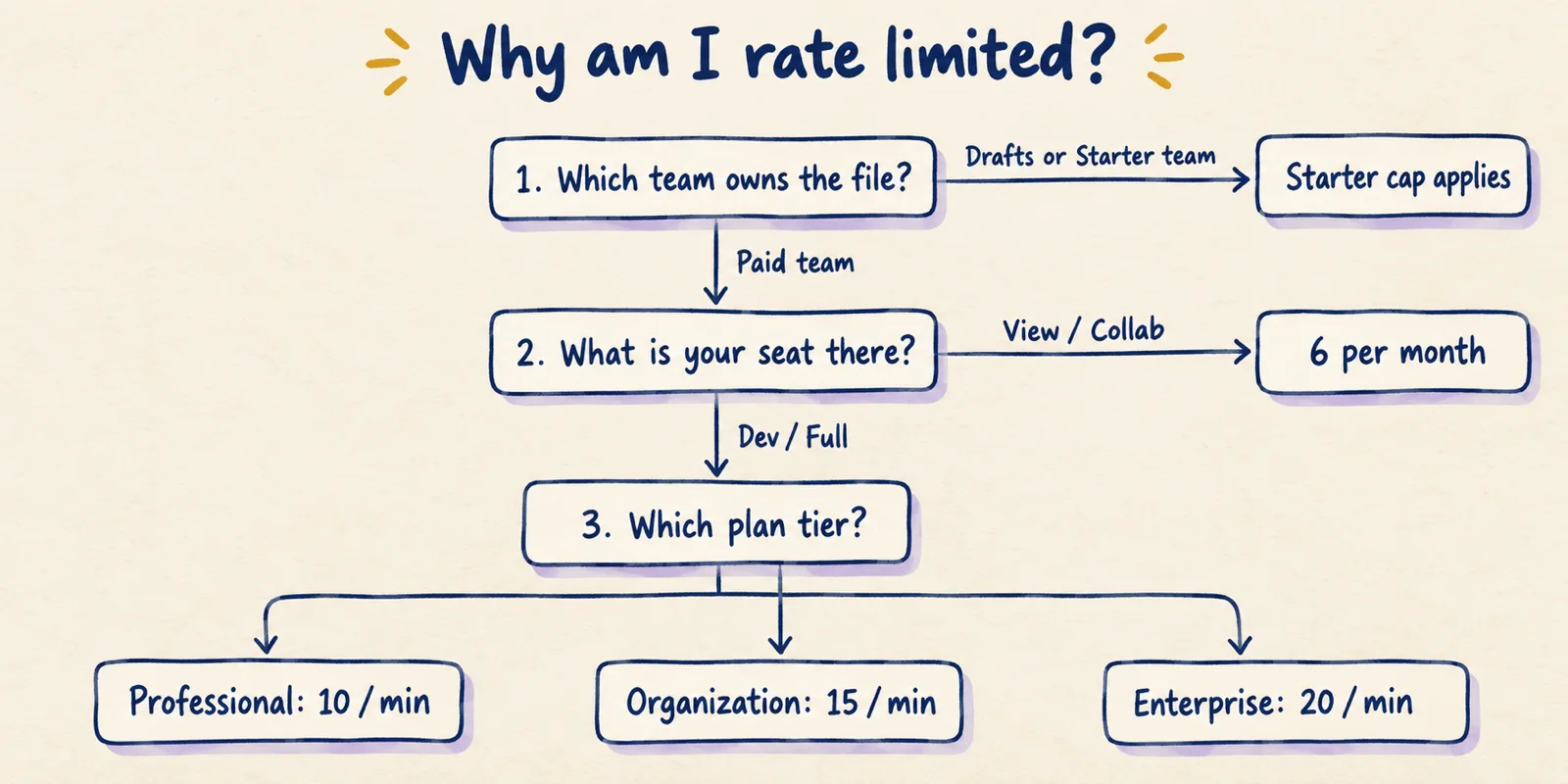
Your limit comes from the plan tier, your seat type on that plan, and the team that owns the file you are reading. View and Collab seats get a handful of calls a month. Dev and Full seats on a paid plan get a daily allowance plus a per-minute cap.
The plan that counts is the file's, not necessarily yours. That is the part that surprises people, and the section on file-owning teams below explains it.
I just tried using the @figma mcp server and got rate limited from a single prompt because it's poorly designed and triggers tons more requests than it should :(
— Kent C. Dodds (@kentcdodds) View on X
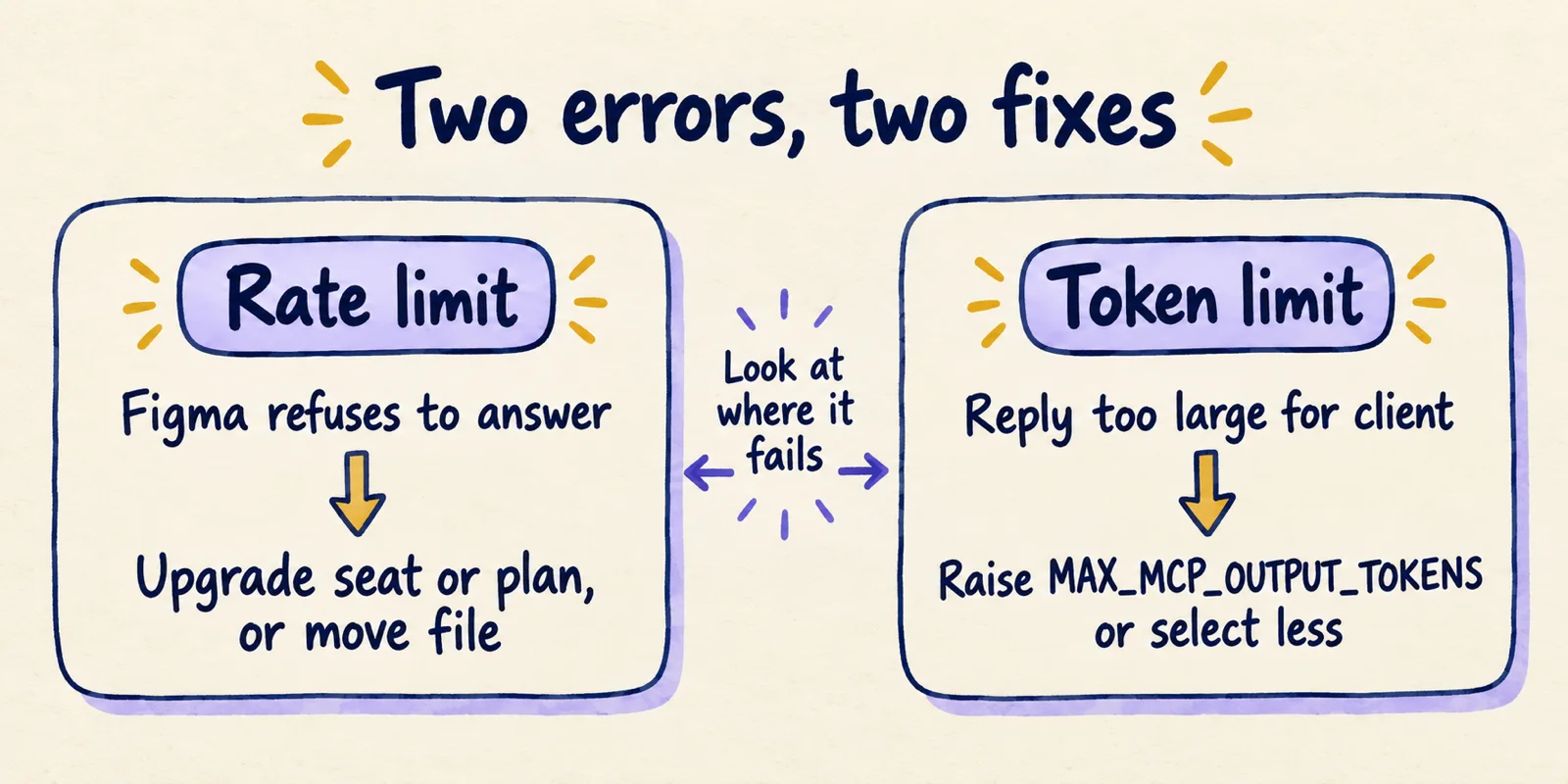
Two failures look alike from inside an agent session. A rate limit means Figma refused to answer. A token limit means Figma answered but your client refused a reply that large. They need different fixes, and the token case is covered in its own section.
The official limits table
Figma lists limits by seat and plan, and per-minute caps apply on top of the daily or monthly counts. The Starter figure applies to both seat rows because the official table merges that cell.
| Seat | Starter | Professional | Organization | Enterprise |
|---|---|---|---|---|
| View, Collab | Up to 20 per month | Up to 6 per month | Up to 6 per month | Up to 6 per month |
| Dev, Full | Up to 20 per month | Up to 200 per day, 10 per minute | Up to 200 per day, 15 per minute | Up to 600 per day, 20 per minute |
Figma Community Support has confirmed the Starter number in public. A staff reply from September 2026 says it plainly.
users on the Starter plan can make up to 20 tool calls per month, and this allowance is separate from Figma AI credits.
Three more details matter. Education plans use the Dev and Full numbers from Professional: 200 a day, 10 a minute. The page tells rate-limited users to upgrade the seat or the plan. And Dev or Full seats on Enterprise get the least restricted use.
On the free plan, seat type buys you nothing: a Starter Dev seat gets the same 20 a month as a Starter View seat. Some older write-ups and one staff reply still say 6 a month for Starter. The current docs page and the September staff reply say 20.
Figma's pricing page repeats the same limits. It lists Dev seats at $12, $25 and $35 a month on Professional, Organization and Enterprise, and Full seats at $16, $55 and $90, with Organization and Enterprise billed annually. Treat prices as a snapshot too.
What counts toward the limit, and what does not
Figma says the limits apply to tools that read data from files, and that some tools are exempt. The docs name three: add_code_connect_map, create_new_file and whoami.
The tools reference lists the read tools used in design-to-code work: get_design_context, get_metadata, get_screenshot, get_variable_defs, search_design_system and download_assets. Read together with the limits page, these are the calls that draw down your allowance.
Staff describe the exempt list a little differently. In two forum threads, from July and August 2026, a staff member lists whoami, add_code_connect_map and generate_figma_design as not counting, where the docs list create_new_file. The docs are the primary source. Still, do not build a workflow that depends on a write tool being free. Whether Figma's newer write tools are exempt is the open question behind how agents write to the canvas.
Several things are simply not documented. The page does not say whether a failed call counts, whether one tool weighs more than another, when the monthly window resets, or whether the remote and desktop servers share a counter. It also gives no error text for hitting the cap.
Why a Pro seat can still behave like a Starter seat
In June 2026 a user on a Professional plan with a Dev seat reported that the limiter still applied Starter limits, even though whoami returned tier: "pro" and seat: "Dev". A Figma community staff member gave the likely cause.
MCP rate limits attach to the team that owns the file you're reading, not to your account or your best seat.
The same reply says whoami reports your highest seat globally, so it can look healthy while a file in Drafts or on a Starter team is capped. The suggested test is one read call against a file you know lives in the Professional team. If that works, move the other file into that team, for instance by saving a local copy and importing it.
This is one staff explanation of one case, not a rule on the limits page. It does fit the docs' permission note, which says you must belong to the plan that owns the file.
A second reported cause is timing. In a March 2026 thread, a user who had upgraded to a Dev seat was still limited on the first call. Community support said seat changes can take time to register and suggested refreshing the MCP connection or restarting the editor. The thread records no final outcome, so treat the delay as a possibility, not a guaranteed fix.
What one design-to-code pass costs in calls
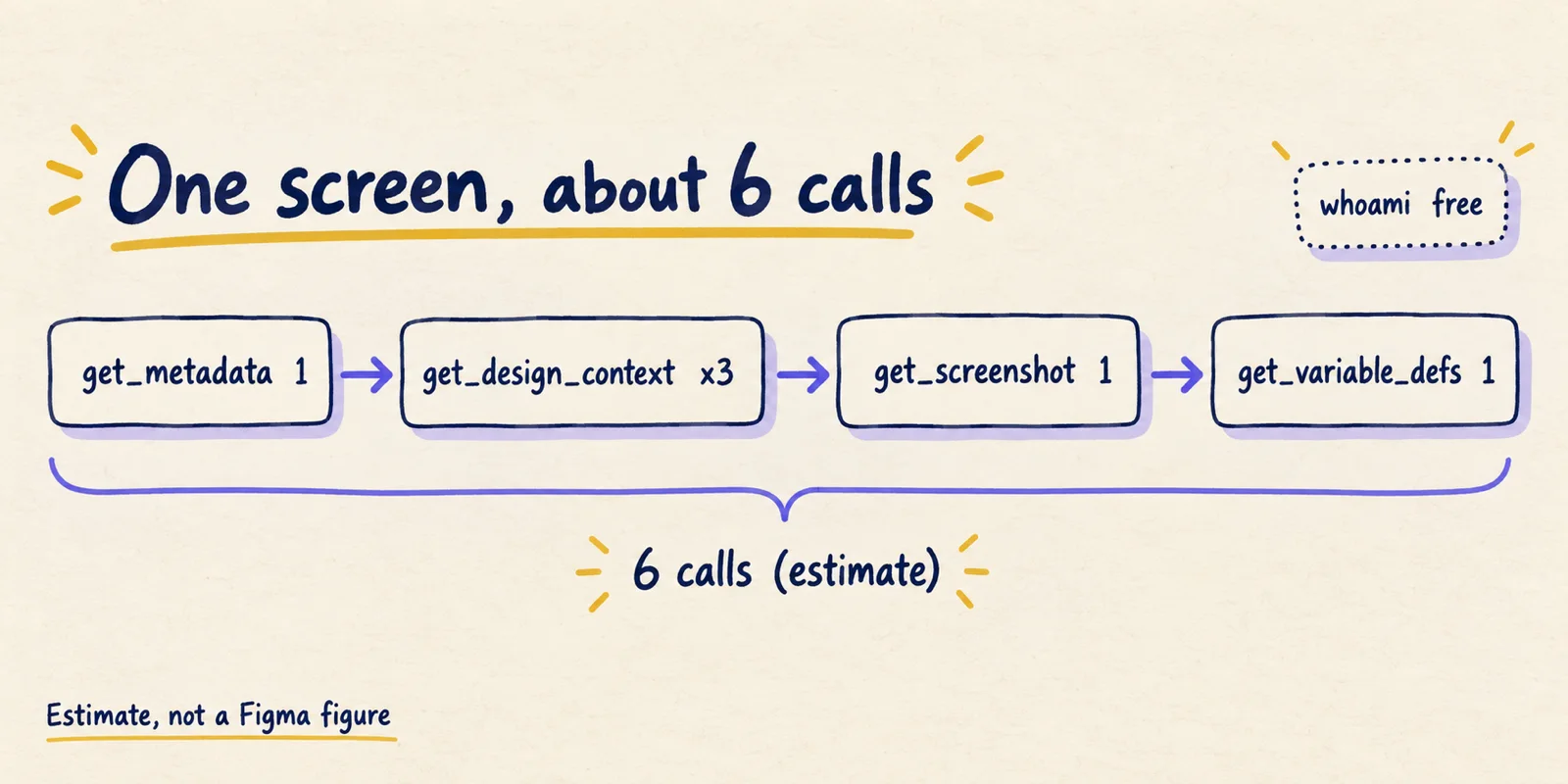
Figma publishes no calls-per-screen figure, so this section is our estimate, built from the tools reference and Figma's advice. The docs say get_design_context returns large output for big selections and point to get_metadata for an outline first. That pushes a careful workflow toward several calls per screen.
| Step | Tool | Calls | Why |
|---|---|---|---|
| Confirm identity and plans | whoami | 0 | Exempt in the docs |
| Outline the screen | get_metadata | 1 | Sparse outline to choose sections |
| Pull each section | get_design_context | 3 | Assumes three chunks |
| Visual check | get_screenshot | 1 | Compare output to the design |
| Token names | get_variable_defs | 1 | Variables used in the selection |
| Total per screen | 6 | Assumes every read counts equally |
On that estimate a 5-screen flow costs about 30 calls. Starter's 20 a month covers roughly three screens. A Professional Dev seat's 200 a day covers about 33, and an Enterprise seat's 600 a day about 100.
In one sitting the per-minute cap bites before the daily one. Six calls fit under 10 a minute, but an agent that works on two screens in parallel will not. Retries are the unknown multiplier, because the docs do not say whether re-fetches after an error are counted.
This is also why the mechanism matters. A tool that hands over structured design data spends calls on every read, while a screenshot-only approach spends none of Figma's allowance, as the comparison of four design-to-code mechanisms explains.
Rate limit or token limit: two errors that look alike
If a call returns data but Claude Code complains about size, that is not a rate limit. Figma's known-issues page gives an example: a get_design_context response of 351,378 tokens against a maximum of 25,000.
The response from the Figma MCP server contains more tokens than your AI assistant can handle in a single response.
Figma's fix is to raise the MAX_MCP_OUTPUT_TOKENS environment variable, for example to 50,000 or 100,000, and restart Claude Code. The Claude Code MCP documentation adds that a warning appears above 10,000 tokens and the default maximum is 25,000. Oversized results with no image content are saved to a file in the session's tool-results directory. Tools that return image data stay subject to the variable. The Claude Code setup walkthrough shows where to set it.
Raising the cap is a patch. Figma's guidance says large, heavy frames can slow the tools, cause errors or return incomplete responses, and recommends generating code for smaller pieces such as a card, header or sidebar. A smaller selection also means a smaller reply.
| Signal | Rate limit | Token limit |
|---|---|---|
| Where it fails | Figma side: no data returned | Client side: data returned but too large |
| Typical text | Not documented by Figma | Response (N tokens) exceeds maximum allowed tokens (25000) |
| Fix | Wait, upgrade the seat or plan, or move the file to a paid team | Raise MAX_MCP_OUTPUT_TOKENS or select a smaller frame |
| More budget helps | Yes | No |
A silent hang is not proof of either. An education-plan user reported figma.loadFontAsync() calls hanging with no error in June 2026, and Figma staff said it did not clearly look like a rate-limit problem and opened a support ticket.
Planning around the limits
Budget by selection, not by session. Splitting work along natural boundaries keeps each reply small and the call count predictable.
- Check identity. Run
whoamifirst. It is exempt and lists your plans and seats, but it does not tell you which team owns the file. - Check the file. Confirm in Figma that the file sits in a paid team, not Drafts.
- Outline first. Pull
get_metadatafor the screen and decide the sections before asking forget_design_context. - Go piece by piece. Request one component or section at a time, and ask for variables once per screen.
- Run screens in sequence. That keeps you under the per-minute cap of 10, 15 or 20.
- Keep a log. Write down the call count when a task ends, so the next estimate comes from your own numbers.
Worked example: a Professional Dev seat building the 5-screen flow needs about 30 calls by our estimate, far inside 200 a day, but should still run screens one after another to stay under 10 a minute. On a Starter plan the same flow would run out of its 20 calls partway through the fourth screen.
Reuse is the other lever. Do the Figma read once, save the extracted context as a spec or notes file in the repo, and let the agent work from that for later passes, which keeps them off the allowance entirely. A guide to Claude Design skills covers the pattern of packaging design context this way. That is our inference from how the limits work, not something Figma documents.
add_code_connect_map is exempt, so mapping components to code does not use the allowance, and it makes later reads more accurate.
What to do when you hit the limit
Rule out the cheap explanations before paying: the file is in the wrong team, a seat change has not registered, or the error is a token limit. Then match the fix to the cause.
Figma's own remedy is to upgrade, and the page spells out the paths.
- Starter: move to Professional, Organization or Enterprise and hold a Full or Dev seat.
- View or Collab on a paid plan: become a Full or Dev seat.
- Organization Full or Dev needing more: move to Enterprise for 600 a day.
- Education needing more: move to Organization or Enterprise.
Education accounts have a route that costs nothing. Staff replying in the K-12 thread say seat changes go through the organization's admin in the People tab, and since Education organizations are free, moving from View to Dev or Full carries no cost.
Once you're on a Dev or Full seat, you'll get the full Education-plan MCP allowance I mentioned earlier: up to 200 calls a day, with a 10-per-minute cap, instead of the 6-per-month limit that comes with a View seat.
An earlier thread records Figma raising Education daily limits to match Professional on July 1, 2026, which the docs now reflect.
Is Figma MCP free? What to expect
You can connect for free, with a ceiling of 20 documented tool calls a month on Starter. That is enough to try the tools and not enough to build a feature. For regular design-to-code work, the lowest documented step with a daily allowance is a Dev or Full seat on Professional: 200 a day and 10 a minute.
These numbers will age. The forum shows Starter described as 6 a month in one place and 20 in another, and the exempt-tool list differs between docs and staff replies. When a page and a reply disagree, trust the page, check its date, and test with a file in a paid team before committing a project to a plan.
Figma's model is a per-seat allowance tied to a file's owning team. Another vendor's design tool meters usage differently; the Claude Design usage limits article contrasts the two, and it is worth knowing which kind of limit you are budgeting for.