AI design tools
Figma MCP in Claude Code: Setup, Errors and Fixes
The exact commands from Figma's own docs, and a table of the errors people hit: stuck authentication, token limits, rate limits and links that carry no node.
· · Diagram Studio Editorial
The setup is one command and one click in a browser. Then you paste a Figma link, Claude Code answers that it cannot reach the design, and /mcp shows a server stuck on "Needs authentication" long after you approved it. Three separate GitHub issues describe nearly that exact afternoon, and all three were closed without a fix.
Most Figma MCP trouble comes from four places: the sign-in handshake, a default cap on how much tool output Claude Code accepts, the call allowance on your Figma plan, and links that point at nothing in particular. Each one looks different on screen, so you can tell them apart in a minute.
It is written for designers and developers connecting Figma's hosted server to Claude Code for the first time, or debugging a connection that half works. It gives the exact commands from Figma's and Anthropic's own docs, a table that maps symptoms to fixes, and a short checklist. We read documentation and issue threads; we did not run Figma ourselves.
Direct answer
Run claude plugin install figma@claude-plugins-official, restart Claude Code, open /plugin, select the figma server, authenticate in the browser, then give Claude a link to a Figma frame. Manual alternative: claude mcp add --transport http figma https://mcp.figma.com/mcp, then /mcp and Authenticate. Figma recommends the remote server over the desktop one.
What you need, and which of Figma's two servers to use
Figma runs two MCP servers, and picking the right one up front avoids most confusion later. MCP, the Model Context Protocol, is the open standard that lets a client such as Claude Code call tools exposed by a separate server.
The remote server is hosted by Figma at https://mcp.figma.com/mcp. The desktop server runs on your own machine through the Figma desktop app, at http://127.0.0.1:3845/mcp. Figma's docs state a clear preference:
Figma strongly recommends using the remote MCP server
| Remote server | Desktop server | |
|---|---|---|
| Where it runs | Figma's hosted endpoint | Locally, via the Figma desktop app |
| Who can use it | All seats and plans | Dev or Full seat on a paid plan |
| How you point at a design | A link to a frame or layer | Your current selection, or a link |
| Writing to the canvas | Supported | Smaller feature set than remote |
The pointing row matters most. If you set up the remote server and tell Claude to build "the frame I have selected", the server has no idea what you selected. That is our inference from the documented behaviour, but it explains why a prompt written for one server fails on the other.
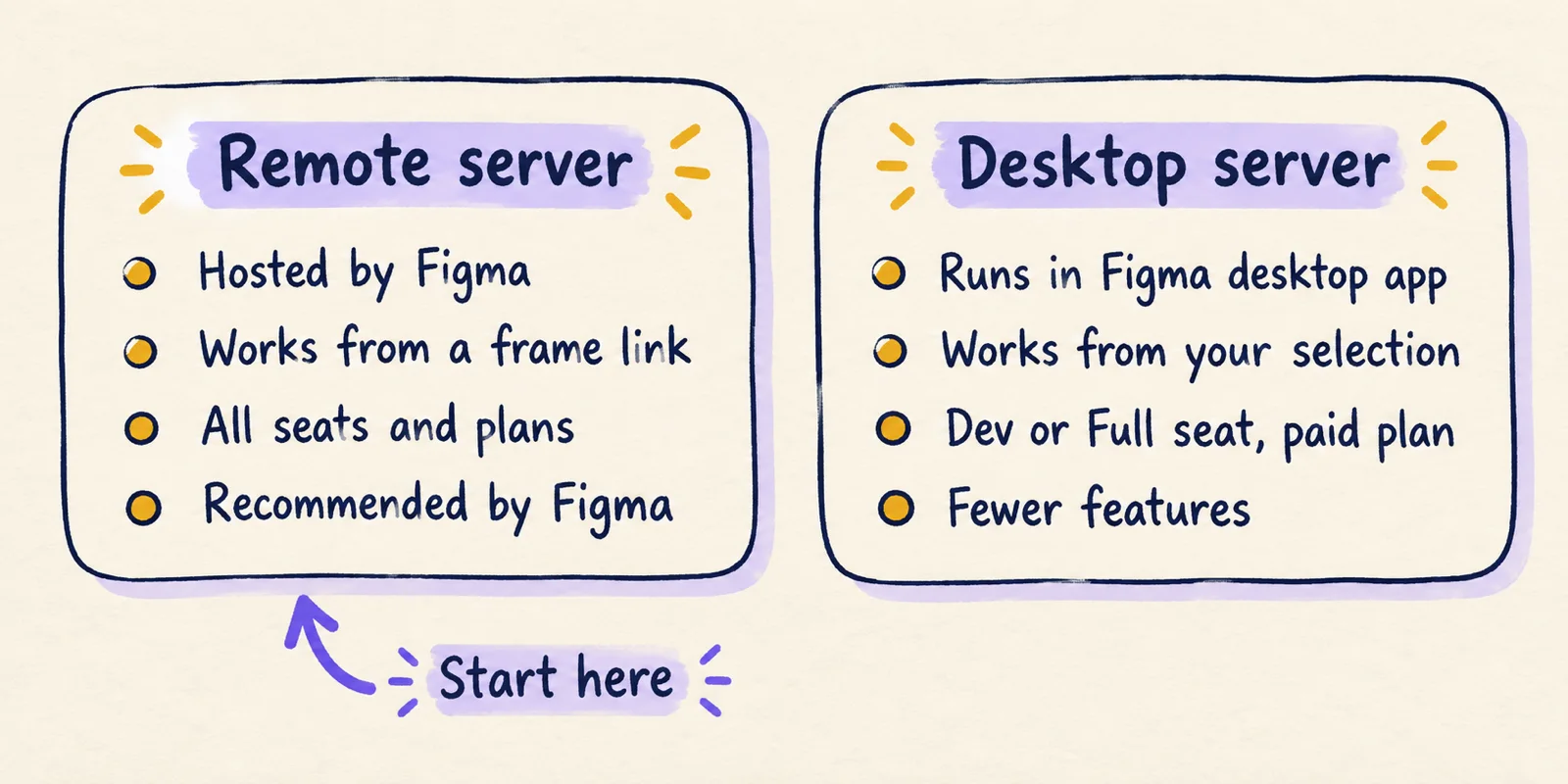
Before you start, you need three things: Claude Code installed with a terminal where claude runs, a Figma account (a free Starter plan works but has a small monthly call allowance), and a link to one frame in a file you can open. The rest of this guide uses the remote server.
Connect Figma to Claude Code and send a first prompt
There are two routes to the remote server, and both end in the same browser approval. Figma's help centre lists the plugin as the recommended one.
Route A, the plugin. Figma's developer docs say it bundles the server settings plus Agent Skills for common workflows; the Claude Design skills guide explains what those skills are and how they load.
- Install:
claude plugin install figma@claude-plugins-official. - Restart Claude Code.
- Type
/plugin, press the right arrow to reach the Installed tab, selectfigma, and press Enter. - Press Enter again to start authentication. A browser page opens; click Allow access.
- Back in the terminal, run
/pluginagain. Thefigmaserver should show as active.
Route B, manual. Run this one command:
claude mcp add --transport http figma https://mcp.figma.com/mcp- Add
--scope userif you want the server in all your projects. - Start a fresh Claude Code session, type
/mcp, select figma, choose Authenticate, and grant access.
A successful run reports that authentication succeeded and Claude Code is connected to figma. The scope flag belongs to Claude Code, not Figma. Anthropic's MCP documentation lists three: local (the default, current project only, stored in ~/.claude.json), project (writes .mcp.json so a team can share it) and user. Each teammate still authenticates with their own Figma account.
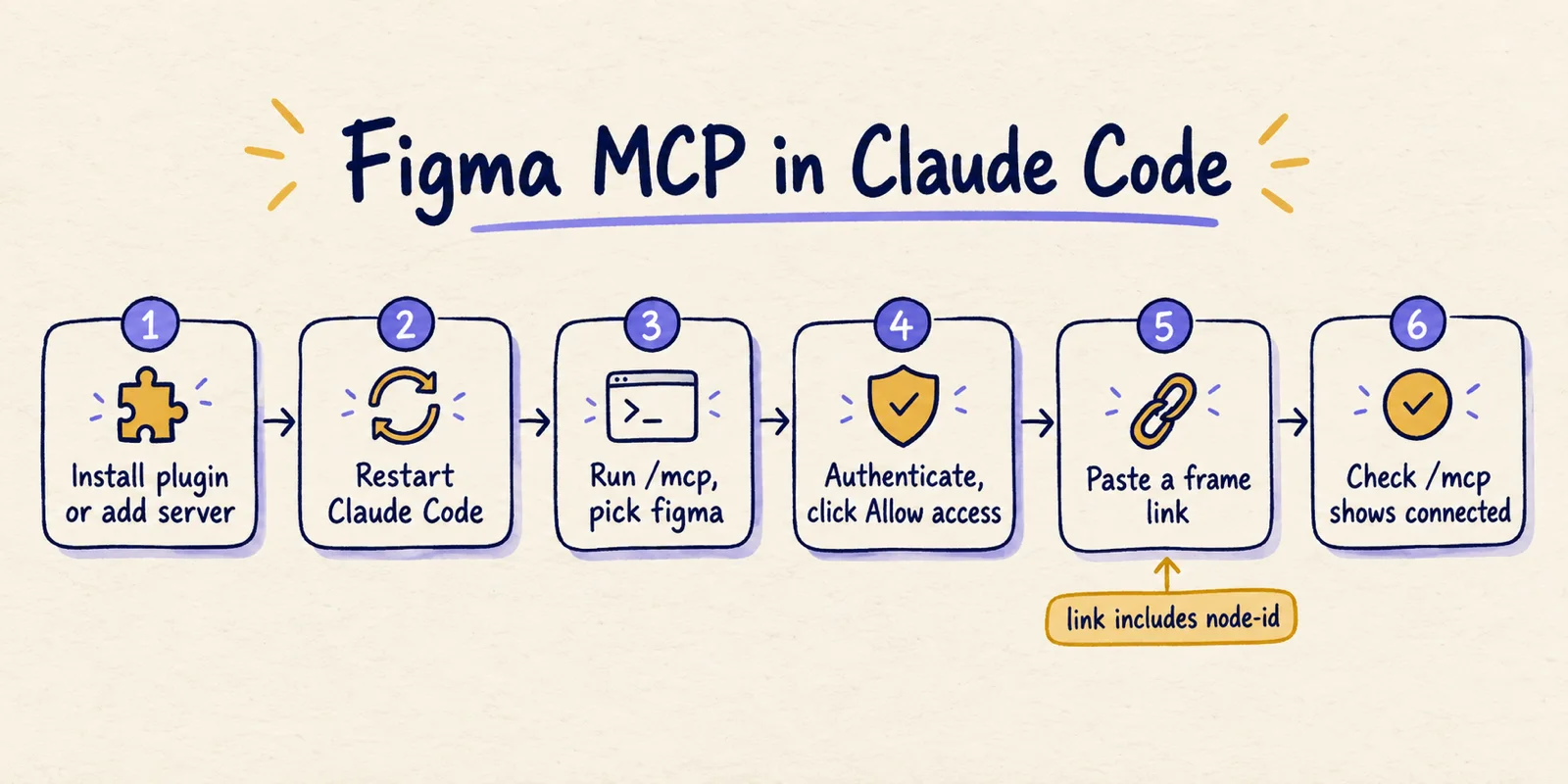
Now check the connection before you write a prompt. /mcp (or /plugin) lists each server as connected, needing authentication, or failed. If figma is not connected, nothing in your prompt will help.
Then copy a link to a frame or layer in Figma. The docs say the server extracts the node-id from that URL to find the object, so a link to a file's front page identifies nothing specific. A first prompt can be as plain as: "Implement this Figma frame as a React component: [link]."
Start with one card or one form, not a full page. Large frames produce large responses, and the next section shows what happens when they exceed Claude Code's cap.
Claude then calls tools on the server. Figma's tools page lists read tools such as get_design_context, get_metadata, get_screenshot, download_assets and get_variable_defs. It also lists write tools including use_figma, generate_figma_design, create_new_file, upload_assets and generate_diagram; how agents use those is covered in how agents write to the Figma canvas.
The desktop server is only worth it if your organisation requires it. It needs the latest Figma desktop app and a Design file:
- Open a Design file in the desktop app and switch to Dev Mode (Shift+D).
- In the MCP server section of the right sidebar, click Enable desktop MCP server.
- Run
claude mcp add --transport http figma-desktop http://127.0.0.1:3845/mcp. - Restart Claude Code.
Beware older tutorials. Builder.io's walkthrough, published July 28, 2025, shows claude mcp add --transport sse figma-dev-mode-mcp-server http://127.0.0.1:3845/sse. That is an older SSE endpoint; Figma's current docs use the HTTP transport and the /mcp path. Copy from the vendor page, and note we have not tried either command.
Match the error to the fix
Each row below pairs a symptom with its likely cause and the fix. Fixes marked documented come from Figma or Anthropic; reported ones come from a GitHub issue or forum thread and are not guarantees.
| Symptom | Likely cause | Fix | Source |
|---|---|---|---|
| "MCP tool get_design_context response (351378 tokens) exceeds maximum allowed tokens (25000)" | The frame returned more tokens than Claude Code accepts by default | Set MAX_MCP_OUTPUT_TOKENS to 50000 or 100000 and restart, or link a smaller frame. | documented |
| figma stays at "Needs authentication" after you approve in the browser | Token not saved after the OAuth callback | Remove and re-add, then retry. The reporter found no workaround. | reported |
| "Got new credentials, but reconnecting to figma failed. Restart Claude Code to retry." | Reconnect hangs after OAuth; the token was stored | Quit Claude Code and relaunch. The token worked on a cold start. | reported |
| Only authenticate tools appear and the auth loop repeats | Server never leaves auth mode | No workaround given; closed as a duplicate. Try claude mcp login figma. | reported |
| 403 on a design link | Missing access or seat, or a stale token | Check Dev Mode access and seat type, then reconnect to refresh the token. | reported |
| Calls fail after a few uses, or "Couldn't send to Figma" | Plan allowance, rate limiting, or an oversized page | Check your plan's limit, wait, simplify the page, reconnect from scratch. | reported |
| Claude cannot find what you "selected" | The remote server works from links | Paste a frame or layer link that includes the node-id. | documented, plus inference |
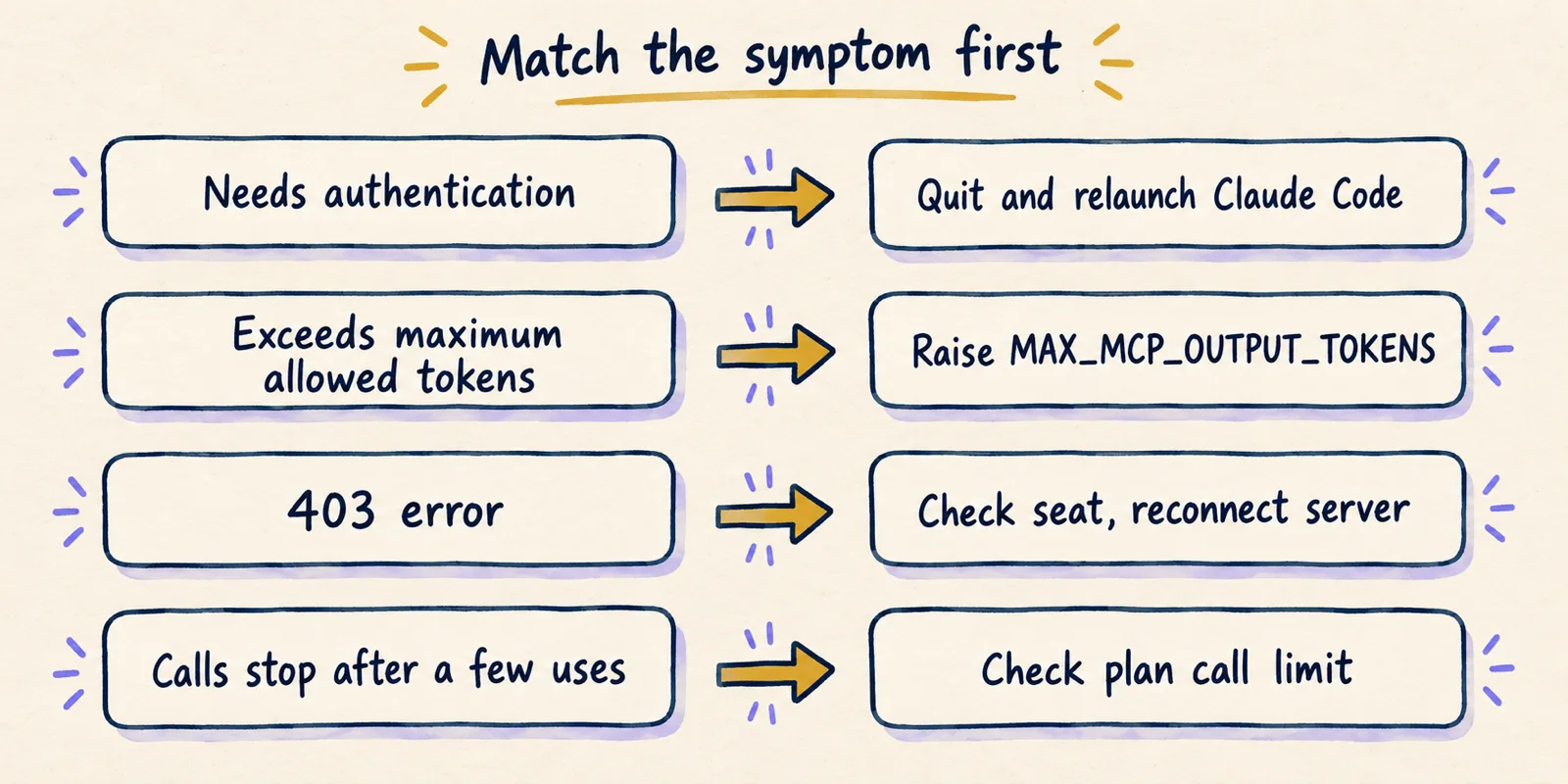
The next two sections cover the entries that need more than a table cell.
Token limits and stuck sign-ins
Figma's known-issues page documents one Claude Code error by name: get_design_context returned 351,378 tokens against a 25,000 limit. Figma's fix is to raise the MAX_MCP_OUTPUT_TOKENS environment variable, with 50000 or 100000 suggested, and restart.
Anthropic's docs confirm the numbers: Claude Code warns above 10,000 tokens of tool output and enforces a default maximum of 25,000. Set the variable in the shell before launching:
export MAX_MCP_OUTPUT_TOKENS=50000claude
Raising the cap treats the symptom. The frame is large, and a bigger cap also spends more of the model's context on one design. Our suggestion, not Figma's: link the component you want, not the page around it, and work through the page piece by piece.
Sign-in failures are less tidy. Official sources describe the happy path only, so the evidence is three GitHub issues against Claude Code, each closed without a recorded fix:
- Issue 35957, March 18, 2026, version 2.0.25 on macOS: authentication completed but no token was written. Closed as not planned. Restarting and re-adding did not help.
- Issue 55943, May 4, 2026, version 2.1.126: the token was stored but the reconnect hung for 30 seconds. Quitting and relaunching fixed it for the reporter. Closed as not planned.
- Issue 61265, May 21, 2026, version 2.1.142: only authentication tools appeared, in a loop. Closed as a duplicate.
These are individual reports on specific versions, and Claude Code ships often. Compare the dates and versions with yours before assuming you have the same bug.
Anthropic documents the tools for a stuck login: /mcp with Re-authenticate or Clear authentication, and claude mcp login <name>, claude mcp logout <name> and claude mcp remove <name> from the shell. Removing the entry lets you add it again cleanly.
One more case, on the desktop server. A January 2026 forum thread reports a 403 when asking Claude Code to build from a URL. A community reply suggested three checks: Dev Mode MCP access, a valid OAuth token (test by reconnecting), and a Full or Dev seat on the team. A 403 usually points at permissions, not a malformed command; that is our inference.
Rate limits: when a working install stops working
Every call Claude makes to read from Figma counts against an allowance tied to your plan and seat. A Starter plan allows up to 20 tool calls per month, and one design-to-code request can use several (context, screenshot, variables), so the allowance can run out mid-task.
Paid seats are far roomier but still capped. Figma's rate limits page lists daily and per-minute caps per plan; the full table and what it means for each seat is in Figma MCP rate limits by seat. Three tools are excluded from the limits: add_code_connect_map, create_new_file and whoami.
Figma staff confirmed the Starter figure on the forum and added that it is separate from Figma AI credits:
users on the Starter plan can make up to 20 tool calls per month, and this allowance is separate from Figma AI credits.
Figma's page does not publish an error message for hitting the limit, and the poster in that thread asked for a usage count and reset date. The documented remedy is to upgrade the seat or plan. How many calls a given prompt consumes depends on the model's choices, so we cannot predict it.
Is it practical? What practitioners report
The docs show how to connect; they say little about whether the output is good. The public evidence is thin, mixed, and partly from 2025.
Anthropic's own account announced the code-to-canvas direction in February 2026:
You can now push what you’re building in Claude Code directly into Figma. With the latest updates to the Figma MCP server, build a working prototype in code, then send it to a Figma canvas to explore multiple versions.
— Claude (@claudeai) View on X
Figma's two authors of the launch post, Gui Seiz and Alex Kern, framed the split between the two tools this way:
The canvas is powerful for diverging—laying out the full experience, seeing the branches, and shaping direction collectively.
Independent practitioners are more cautious. Vishwas Gopinath at Builder.io, writing in July 2025 about an earlier version of the server, named a limit that still shapes how you should prompt:
Without a deep understanding of how your design system works, it's difficult to make surgical updates to existing code, often requiring regeneration or manual edits.
He also noted that multi-frame flows must be converted one frame at a time and stitched together by hand. On Figma's forum, a June 2025 poster reported wrong colours and fonts from Claude Code and Cursor, and later wrote that restarting Figma before using the MCP fixed it. A Figma staff reply said the server then ran locally in the desktop app, so this is a cheap thing to try on the desktop server.
Our reading: the server is a dependable way to give an agent structured design context when the connection works and the frame is small. It is a weaker fit for large pages, free-plan usage and edits to existing code. Whether the generated code matches your design depends on your design system and prompts, and we found no verifiable measurement. For how this mechanism compares with screenshots, exports and prompt-to-app tools, see the four design-to-code mechanisms. We could not read the r/FigmaDesign threads because Reddit blocked automated access, so none are cited.
A first-run checklist that separates setup from prompt problems
When something fails, this order finds the broken layer in the fewest steps. Each check maps to a row in the error table.
- Run
/mcp(or/plugin). If figma is not connected, fix sign-in first: Re-authenticate,claude mcp login figma, then fully quit and relaunch Claude Code. - Run
claude mcp list. Afigmaentry athttps://mcp.figma.com/mcpneeds a link in the prompt; afigma-desktopentry needs the desktop app open with Dev Mode enabled. - Use a link to one small frame, copied from Figma so it includes the node-id.
- On a token-limit error, raise
MAX_MCP_OUTPUT_TOKENSto 50000 or link a smaller frame. - If calls fail after a few successes, compare your plan and seat with the limits before changing anything else.
- On a 403, confirm your seat type and reconnect the server.
Worked example: Claude says it cannot access the design, you are on the remote server, and /mcp shows connected. That rules out sign-in. Three suspects remain: a link without a node-id, no permission to view that file, or an exhausted plan allowance. Checking them takes a minute and needs no reinstall.
Where this leaves you
You can connect Figma to Claude Code in a few minutes with Figma's own commands: the plugin install or claude mcp add --transport http figma https://mcp.figma.com/mcp, then browser authentication. The remote server is the one Figma recommends, and it works from links.
When it fails, it is rarely the command. Look at sign-in persistence in some Claude Code versions, the 25,000-token output default, your plan's call allowance, and links without a node, in that order. The table above maps each to a fix.
The other direction is also worth knowing: a design made in Claude Design can reach Claude Code without Figma at all, as described in the Claude Design to Claude Code handoff. Figma's limits and commands may change, so check the linked pages before relying on a number.