Design systems
Design System Diagrams: The Four Maps Worth Drawing
Most design system diagrams show everything and answer nothing. Four maps, each tied to one question and built from the public docs and repos of Carbon, Material, Primer and GOV.UK, cover the ground.
· · Diagram Studio Editorial
Search for "design system diagram" and most of what comes back is a software-architecture chart or a Pinterest board of component sheets. The phrase has no settled meaning, so people draw whatever is nearest: the ecosystem poster with tokens, Storybook, Figma libraries and repositories crammed into one frame. It looks thorough. Then a new engineer asks which package to upgrade first, and the poster has no answer.
The problem is that a design system raises several unrelated questions, and one picture cannot answer them all. This piece is for designers, design-system engineers and product teams who want a diagram that earns its place. It names four questions worth a drawing, token flow, component anatomy, package dependencies and contribution and release, and builds each from public documentation and repositories of Carbon, Material, Primer and GOV.UK.
Afterwards you should be able to pick the one map your team needs, draw it from checkable sources, and date it. We read documentation and repository files; we did not interview these teams or test their tooling.
Direct answer
A design system diagram is a drawing that answers one question about the system for one reader. Four maps cover most needs: a token flow map (what changes when a value changes), a component anatomy map (what the parts are called), a package dependency map (what depends on what), and a contribution and release map (who decides, and how a change ships). Draw each from public evidence, not memory.
A design system diagram answers one question
A design system is a set of reusable decisions and parts (design tokens, components, guidance, code packages) plus the people who maintain them. A design system diagram is a drawing that lets one reader answer one question about that set faster than the docs would.
Brad Frost drew one of the best-known all-in-one posters, and he was candid about its limits when he published it:
nearly all of these layers are optional and don't necessarily apply to every organization.
Four questions come up again and again, and each has its own natural diagram. The table shows what each map needs as evidence and which public system documents it well enough to learn from.
| Map | Question it answers | Main reader | Draw it from | Public example used here |
|---|---|---|---|---|
| Token flow | If this value changes, what else changes, and what may a component reference? | Designers who theme, engineers who consume tokens | Token documentation and token files | Material; Primer |
| Component anatomy | What are this component's named parts, and which are optional? | Designers, engineers and writers | The anatomy page and API or token names | Carbon button |
| Package dependencies | What do I install, and what depends on what? | Engineers upgrading or debugging | Each package's declared dependencies | Carbon; Primer React |
| Contribution and release | Who decides, and how does a change reach a release? | Contributors and product teams | Published criteria and release runbooks | GOV.UK; Primer React |
Map 1: token flow, from raw value to component
A token flow map shows which tokens may point at which, so a reader knows what a change will touch. A design token is a named design decision, such as a colour or spacing step, stored where both design tools and code can read it. Most public systems arrange tokens in tiers, and the tiers are what is worth drawing.
Material documents three. Per the Material Web docs, reference tokens "hold concrete values, such as a hex color, pixel size, or font family name". System tokens define decisions and roles. Component tokens attach to elements and can be system tokens or concrete values. The docs give the direction of the arrows: a component token maps to a system token, which has a reference value. Their own example overrides a component token with a system one: --md-filled-button-container-color: var(--md-sys-color-error).
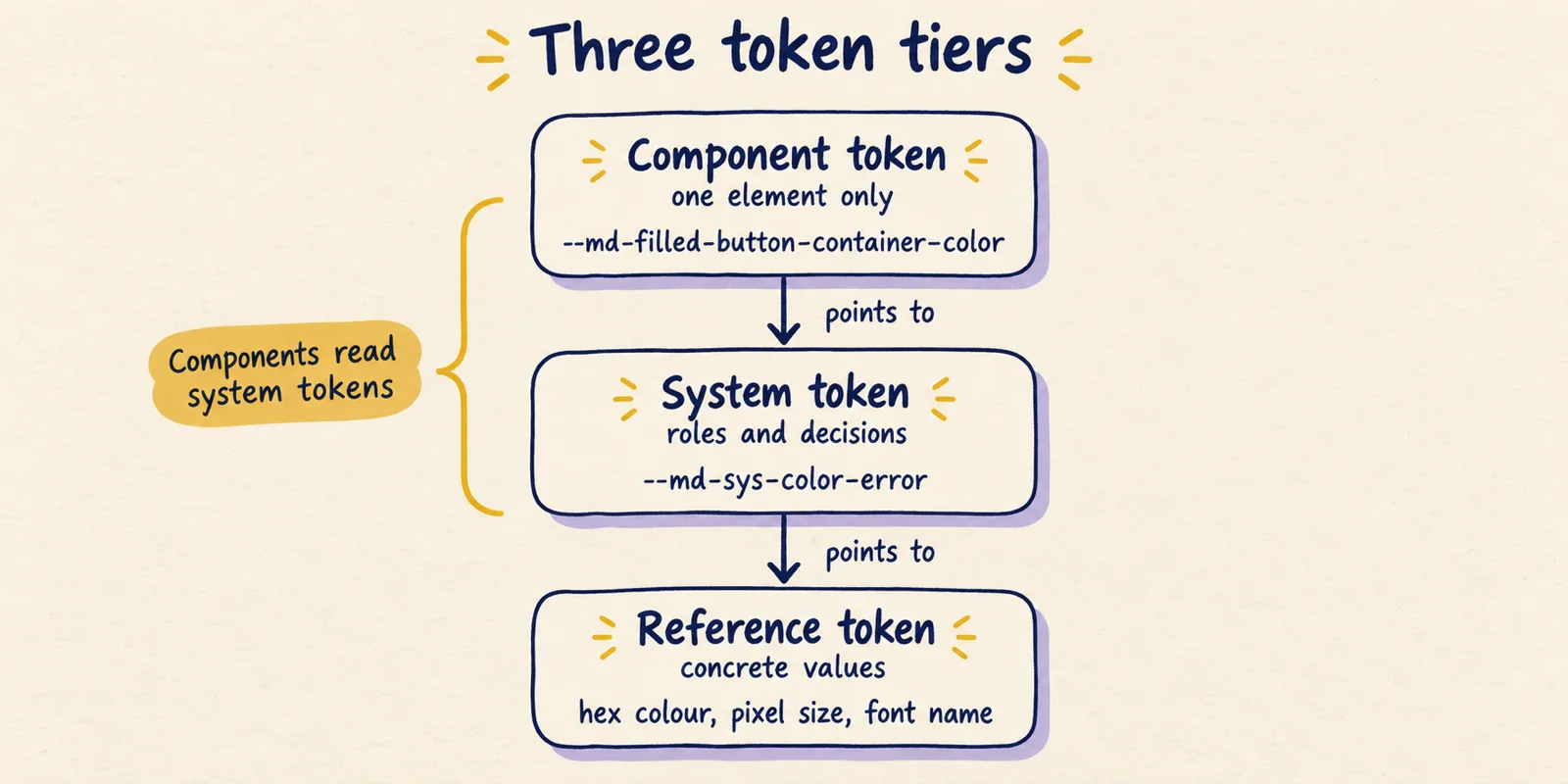
Primer, GitHub's design system, has the same structure under different names. Its naming guide describes base tokens that map to raw values (base-size-4), functional tokens for global UI decisions (bgColor-inset, borderColor-default) and component or pattern tokens scoped to component CSS (button-primary-bgColor-hover). Compare systems by their tiers, not their vocabulary.
The structure matters because of what it forbids. Frost's design systems Q&A recommends "a three-tiered token system for creating themeable design systems" and keeping component-specific tokens for narrow cases, because they multiply fast. So draw arrows in one direction only, and label what each tier may point at. Frost has also put tokens in their place relative to atomic design:
"What's the relationship between design tokens and atomic design?" is a question I hear a lot. Design tokens are "subatomic particles" which are critical to a UI design system but not functional on their own.
— Brad Frost (@brad_frost) View on X
If your tokens live in files, say which format on the map, because the format decides how aliases between tiers are written. The Design Tokens Community Group published the first stable version of its specification, 2025.10, on October 28, 2025. It is a Community Group report, not a W3C Standard. How AI agents cope with each token format is a separate question, covered in Markdown or JSON for design tokens, and what Google's DESIGN.md linter finds in public files shows what happens when tiers become a file an agent reads.
Map 2: component anatomy, naming the parts
An anatomy map labels a picture of a component with its part names and marks which parts are optional. Its job is shared vocabulary: when a designer says "container", an engineer writes container and a technical writer documents it, all three mean the same thing.
Carbon's button usage page shows how. It labels three parts, Label, Container and Icon (optional), across four button types. The ghost button has no visible container and the icon-only button has no label. That variation is the valuable part. A map showing only the fullest variant hides the cases where a part is absent, and those cases start review arguments.
Part names work best when they match names elsewhere in the system. Material Web's filled-button tokens are named after parts: container-shape, container-color, label-text-color. Whether Material's anatomy page uses the same words we could not check, because the page renders client-side and its text was not retrievable. Our reading: the best anatomy maps share vocabulary with token names and the component API, so any part in the drawing can be found in code.
Documentation structure can double as an anatomy checklist. The GOV.UK button page runs through when to use, how it works, variants (each with an example, HTML, a Nunjucks macro and an options table), double-click prevention, research findings and recent changes. That is a template of what every component page should answer, and it pairs well with a drawing.
Map 3: package dependencies, what depends on what
A package dependency map shows engineers what to upgrade and where a bug can originate. It is also the one map you can nearly generate, which makes hand-drawn versions go stale quickly. A design system usually ships as several packages: tokens, styles, icons, framework components.
Carbon is a good case. Its monorepo README lists twelve packages, and each package.json declares its dependencies. The declared chain runs from @carbon/react to @carbon/styles, then @carbon/themes, @carbon/type, @carbon/grid and finally @carbon/layout. Side branches reach @carbon/icons-react from react, @carbon/motion from styles and @carbon/colors from themes. The figure shows only that backbone.
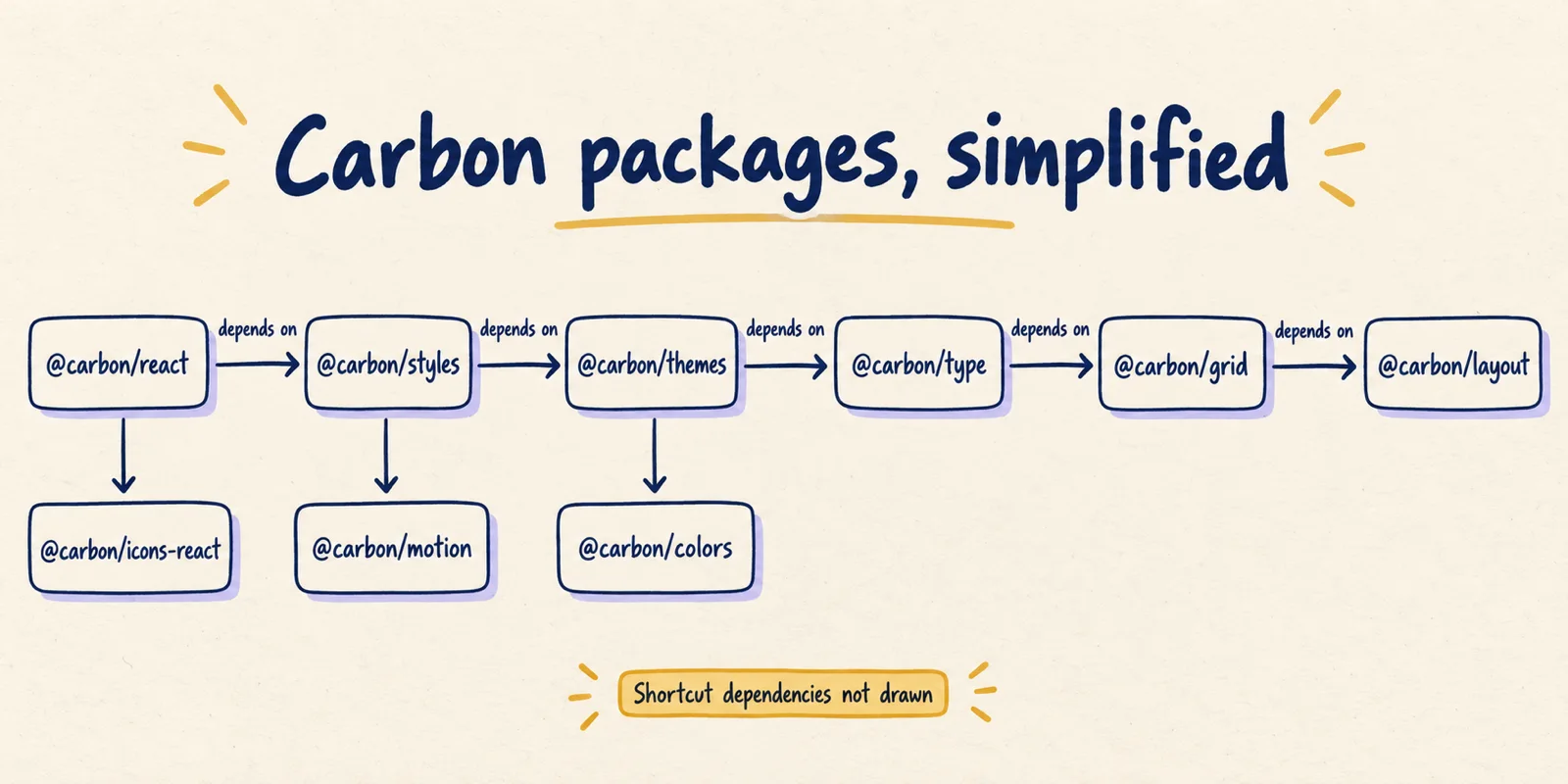
The full list answers what the simplified picture cannot. @carbon/react (version 1.117.0) declares @carbon/feature-flags, @carbon/icons-react, @carbon/layout, @carbon/motion, @carbon/styles and @carbon/utilities. @carbon/layout (11.60.0) declares no Carbon dependencies. So a change in layout can reach react, styles, themes, type, grid and elements, while colors, motion and icons-react sit outside its path. That is our inference from declarations; version ranges and lockfiles can narrow what a given product actually receives.
Primer's graph is smaller. @primer/react (38.40.0) declares @primer/behaviors, @primer/live-region-element, @primer/octicons-react and @primer/primitives, and @primer/primitives (11.10.0), the home of the Map 1 tokens, declares no Primer dependencies. The token package sits at the bottom of the stack, mirroring its role in the tier model. The repository comparison of ten public systems shows how differently other systems split their packages.
Two cautions. Versions move constantly, so a package map needs a date. And an ecosystem poster is no substitute: to answer what depends on what, draw only dependencies.
Map 4: contribution and release, who decides and how it ships
A contribution and release map follows a change from an idea to a published version. Its readers are people who want to propose something and product teams waiting on a fix. Keep proposal and release as separate flows, because different people run each.
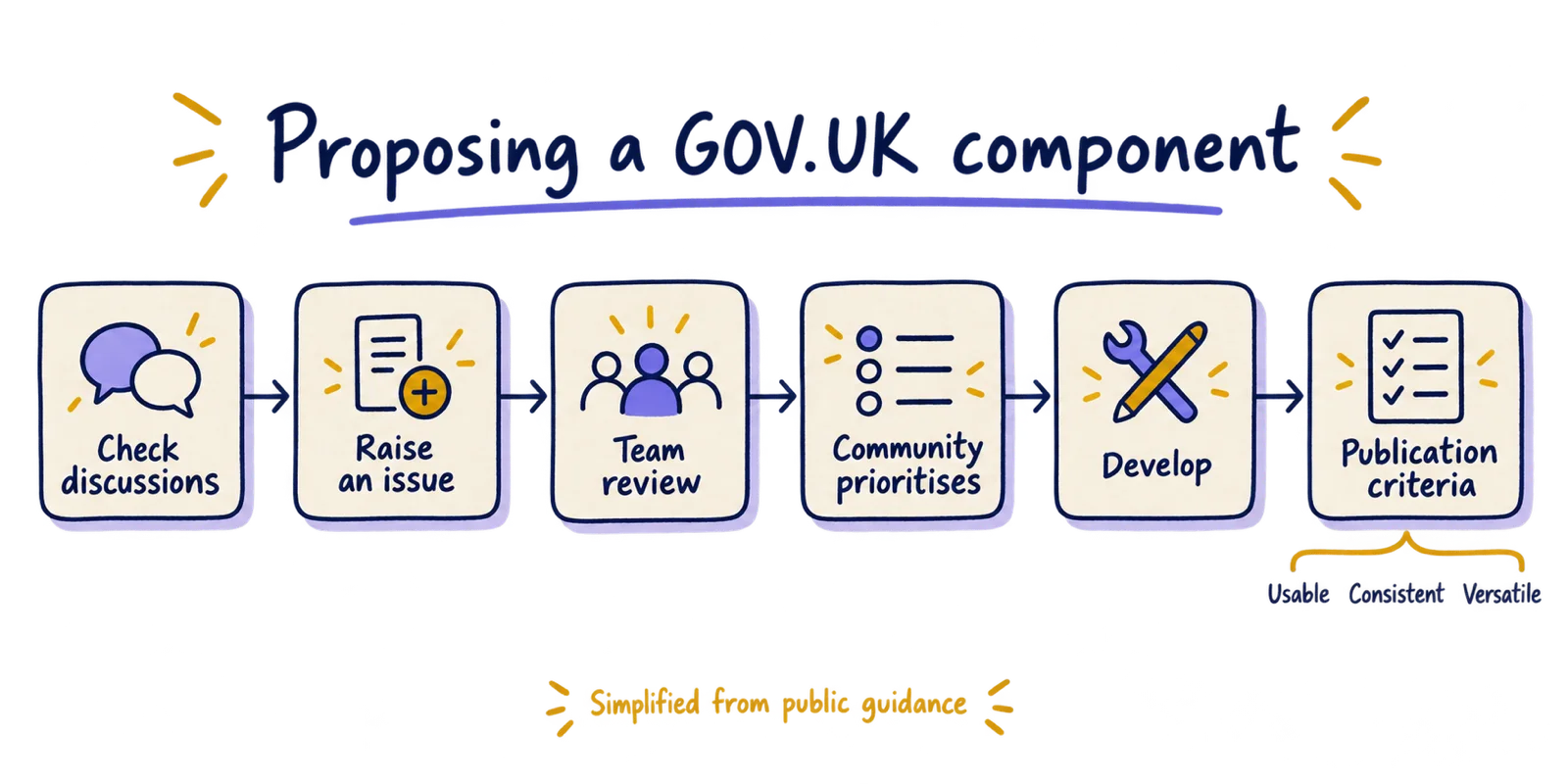
The GOV.UK Design System publishes how to propose a component or pattern. You check existing GitHub discussions, raise an issue with evidence of user need (not designs or code), and ask the team to review it. Then the proposal enters a yearly community prioritisation. At proposal the work must be useful and unique, meaning it does not replicate something already in the system. At publication it must also be usable (tested with representative users, including disabled people), consistent and versatile.
Release is documented separately. In GOV.UK Frontend's runbook, a maintainer runs a build-release workflow, a second developer reviews the resulting pull request, and a publish-to-npm workflow needs a second developer's approval. A GitHub release workflow follows, and a follow-up page covers updating documentation repos, emailing subscribers and posting to Slack. Primer React is lighter: contributors add a changeset to a pull request, a maintainer reviews it, minor and patch changes ship weekly, and breaking changes are bundled into a major release twice a year (per its contributor docs; cadence may have changed).
Frost's governance diagram covers the product team's side, with ten steps from using the system to adoption and QA. His October 2024 update sorts incoming issues into bugs, design discrepancies, system features and recipes, and he walks through it in a talk:
He also argues that the diagram is not the point. In a July 2024 post he writes "when in doubt, have a conversation", noting how much governance happens as a quick chat. A workflow map should show where a person can ask, not only the formal path. The same applies when an agent builds on your system: how Figma's agents write to the canvas is easier to reason about once your own token and component maps exist.
Where atomic design fits among the four
Atomic design is a composition map, and it answers a different question from the four above. It has five stages: atoms (elements that cannot be broken down further), molecules (simple groups of atoms), organisms (relatively complex interface sections), templates (components laid out) and pages (templates with real content). Frost frames it as a mental model:
think of the stages of atomic design as a mental model that allows us to concurrently create final UIs and their underlying design systems.
The question it answers is how small parts build into larger ones, which is real and useful for component libraries. But it sorts components by size, and none of the four questions here is about size. It does not say what changes when a colour changes, what a button's parts are called, which package holds what, or how a proposal becomes a release. Our reading: a team with only the atomic diagram has an accurate picture that cannot answer most questions its users ask.
In practice an atoms-molecules-organisms listing works as an index of components, provided each entry links to its anatomy and token facts.
How to draw one of these maps from evidence
The same six steps work for all four maps. The example in the last step uses the Carbon facts above.
- Question. Write it as one sentence and name the reader. If two readers need different answers, draw two maps.
- Evidence. Pick the source that answers it: token docs, an anatomy page,
package.jsonfiles, contribution criteria, a release runbook. If the only source is someone's memory, say so on the drawing. - Words. Use the system's own terms for every node. Do not rename "functional tokens" as "semantic tokens" because you prefer it.
- Arrows. Give each arrow one meaning (points to, depends on, then) and keep it throughout.
- Omissions. Mark what you left out, such as "shortcut dependencies not drawn", and put the date and source in the caption.
- Test. Ask someone who has not seen it the step-one question. For example, ask a new engineer what a change in the layout package can affect. If they cannot answer, a dependency is missing or the arrows are ambiguous.
Any tool works. A hand-drawn look has a practical benefit, since it signals a sketch to be checked rather than a finished authority, a point made in why hand-drawn diagrams still work in AI products. For the package map in particular, an architecture diagram generator can turn a dependency list into an editable first draft. (Disclosure: that tool is from Diagram Studio, the team that publishes this site; the figures here were made with an image tool and checked against sources, not with it.)
Common mistakes, by map
Each map fails in a predictable way. These are our inferences from the sources above, not findings from a study.
| Map | Common mistake | Repair |
|---|---|---|
| Token flow | Components point straight at reference values, or arrows run both ways | One direction only; label what each tier may point at |
| Token flow | Every token drawn instead of the tiers | Show tiers with one or two example names each |
| Anatomy | Only the fullest variant is drawn | Show variants where a part is absent, as Carbon does for ghost and icon-only buttons |
| Anatomy | Part names differ from API and token names | Reuse names from code, then check them |
| Package dependencies | Drawn from memory or an aspirational stack | Generate from declared dependencies and date it |
| Contribution and release | Both stages merged into one flow | Two maps, since different people run each |
| Contribution and release | No place to ask a person | Mark the conversation channel on the map |
Draw the question first, the system second
A design system diagram earns its place when a reader can put a question to it and get a checked answer. The package dependency map is the cheapest to make accurate, since the facts sit in the repository. The token map records which way references may travel, which is the rule theming depends on. The anatomy map settles arguments over names, and the workflow map is the one an outsider needs to propose a change.
Start with whichever question your team gets asked most, draw only that map from a public or internal source, and put the date on it. Versions, cadences and process pages change, so check the linked sources before copying a figure.