AI design systems
What Google's DESIGN.md Linter Finds in 48 Real Public Files
48 public DESIGN.md files, one linter version, every finding logged. What the rules catch, what slips through and how to read a clean run.
· · Diagram Studio Editorial
You can lint a DESIGN.md file in one command, and most teams that try it will read the result the same way: no errors, so the file is fine. We wanted to know how far that reading holds, so we collected 48 DESIGN.md files from public GitHub repositories and ran Google's linter on every one.
The surprise was where the errors came from. 21 files failed, and almost none of the failures were design mistakes. They were ordinary CSS values the format does not accept. The bigger surprise was what passed: prose that contradicted the tokens, a 2px display font, and one file the linter could not read at all.
If you are weighing a DESIGN.md lint step, here is what the sample says. By the end you will know what the linter catches, what it ignores, and how to read a green result without trusting it too much. We ran the linter only; we did not test what any AI agent does with these files.
Direct answer
In a non-representative sample of 48 public files run on linter 0.4.0 (October 1, 2026), 21 exited with errors, mostly CSS values like clamp() that DESIGN.md dimensions reject. Orphaned tokens were the most common warning. The linter checks tokens and structure, not whether prose matches tokens, so a clean result is not proof of a coherent design system.
What we ran, and what surprised us
The headline numbers are simple. Of 48 files from 46 repositories, 21 exited with an error, 27 exited cleanly, and 8 of those produced neither errors nor warnings.
| Measure | Result |
|---|---|
| Files / repositories | 48 / 46 |
| Exited with an error (code 1) | 21 |
| Exited cleanly (code 0) | 27 |
| Clean: no errors and no warnings | 8 |
| Total errors / warnings | 98 / 496 |
| Findings with no rule ID at all | 182 (carrying 96 of the 98 errors) |
| Most common warning | Orphaned token, in 28 files |
Three things stood out. First, the most common error was not a design choice. It was a CSS value, such as a clamp() font size, normal letter spacing or a bare 0, that the format does not accept as a dimension.
Second, the linter let several obvious problems through. It stayed silent on prose that contradicted a token, an emptied Colors section, a 2px display font, and a duplicate section heading that the spec says should be rejected.
Third, one file passed because the linter never read its tokens. A green exit code and a clean file are not the same thing, which is the point the rest of this article tests.
What a DESIGN.md file is
DESIGN.md is a plain-text format for describing a visual identity to coding agents. Google Labs open-sourced the draft specification on April 21, 2026, and Stitch announced it the same day. The repository is Apache-2.0 licensed and the format is labelled alpha.
Today, we’re open-sourcing the draft specification for DESIGN.md, so it can be used across any tool or platform. We’re also adding new capabilities. DESIGN.md lets you easily export and import your design rules from project to project. Instead of guessing intent, agents know
— Stitch by Google (@stitchbygoogle) View on X
A file has two parts. The first is optional YAML front matter holding design tokens: named values for colors, typography, rounded, spacing and components. Tokens can reference each other with curly-brace paths such as {colors.primary}.
The second part is Markdown prose in a fixed set of ## sections (Overview, Colors, Typography, Layout, Elevation & Depth, Shapes, Components, Do's and Don'ts) that explains why the values exist. Google's announcement, written by engineer Cassia Xu, frames the point as portability.
DESIGN.md lets you export or import your design rules from project to project, so you don't have to reinvent the wheel every time you start a design in Stitch.
The prose half is the one a linter cannot judge, and writer Rich Holmes explains why it exists: it covers the cases tokens do not.
“The brand personality is optimistic, trustworthy, and active” or “never crowd elements” are instructions that can't be tokenised but can guide a decision.
The spec itself ranks the two halves: tokens are the normative values, and prose provides context. That sentence frames everything that follows. A tool can verify tokens, so a linter has a clear job there. Nothing in the spec requires the prose to agree with them.
DESIGN.md is one of several ways to give an agent standing instructions. Skills and rules files are others, and our guide to Claude Design skills covers how those compare and how to judge one.
What the linter says it checks, and where it differs
The CLI has four commands: lint, diff, export and spec. design.md lint <file> prints a JSON report of findings, each with a severity, and exits with code 1 when there is at least one error. In 0.4.0, passing --format text still printed JSON in our runs.
The repository README lists eleven rules. The table shows each one with its documented severity and what happened across our 48 files.
| Rule | Documented severity | What it checks (documented) | In the 48 real files (logged) |
|---|---|---|---|
| broken-ref | error | References that do not resolve | 38 / 3 files. 2 errors (unresolved reference, 1 file); 36 warnings (unrecognized component sub-token, 3 files) |
| missing-primary | warning | Colors defined, no primary | 24 files |
| contrast-ratio | warning | Component text/background pairs under 4.5:1 | 37 / 13 files |
| orphaned-tokens | warning | Colors never referenced by a component | 303 / 28 files |
| token-summary | info | Counts of tokens per section | 45 files |
| missing-sections | info | No spacing or rounded section | 11 / 9 files |
| missing-typography | warning | Colors but no typography | Never fired (fired in our probe) |
| section-order | warning | Sections out of canonical order | Never fired (fired in our probes) |
| unknown-key | warning | Top-level key that looks like a typo | Never fired (fired in our probe) |
| token-like-ignored | warning | Unknown top-level key holding token-like values | 10 / 4 files |
| omitted-rules | info | Checks the omitted configuration | Never fired (not probed) |
Two things in that table differ from the documentation. broken-ref is documented as an error, but 36 of its 38 findings were warnings, because it also covers component properties the spec does not list, such as fontSize and minHeight. Only the 2 genuinely unresolved references were errors.
Also, the installed 0.4.0 package README says "seven rules" yet lists eight, while the main-branch README says eleven. The package does contain the extra rule IDs, so our reading is that the README lags the code.
The table also leaves out a whole class of findings. 182 findings had no rule ID: they come from the parser, not a named rule, and cover invalid dimensions, invalid colors, unrecognized typography properties and YAML errors. They carry 96 of the 98 errors. If you filter CI output by rule ID, you will miss most of what actually failed.
How the 48 files were chosen and run
Selection was mechanical, which makes it reproducible and also biased. We searched GitHub code for files named DESIGN.md containing both colors: and typography:, took results in the default order, kept the first file from each repository, and stopped at 45 third-party repositories. We added the three example files in Google's own repository.
The query requires token-like text, so files with no tokens never entered the sample. A few turned out to contain none anyway; one is a lowercase design.md about a compression library. We kept it and report what the linter said.
Each file was downloaded at the commit SHA from the search hit, linted in a scratch directory outside any project, and written out as JSON. The manifest, raw output per file, scripts and tool versions are in the article's evidence folder. We do not know who or what wrote any of these files and make no claim about it.
- Command:
npx design.md lint --format json <file>, with@google/design.md@0.4.0installed. - Package: 0.4.0 was the latest on npm, published July 27, 2026; the first release, 0.1.0, came out April 21, 2026.
- Result: 21 of 48 exited 1 and 27 exited 0, with 98 errors and 496 warnings in total.
What failed most: valid CSS the format will not accept
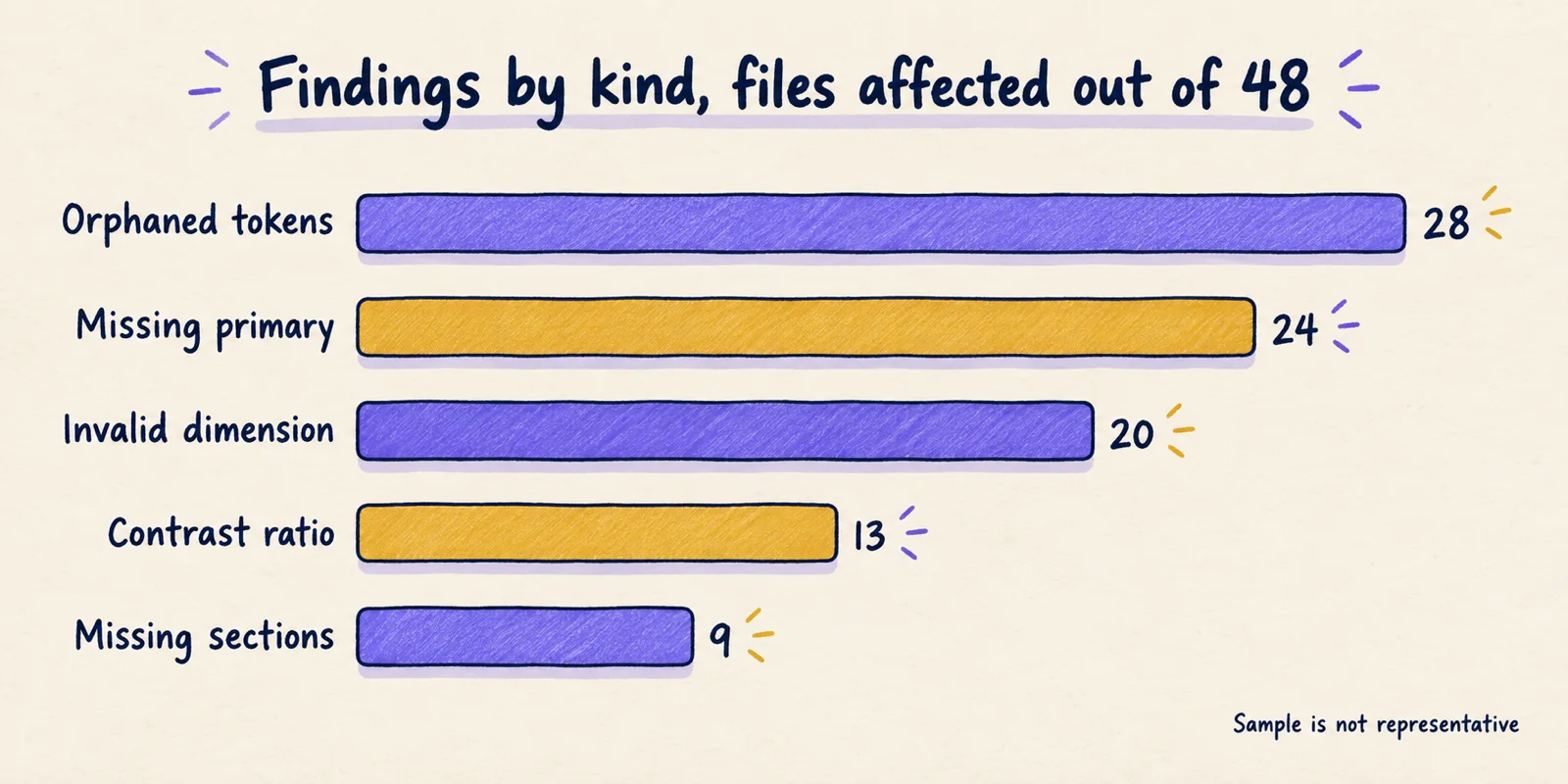
Invalid dimensions failed 20 of the 21 failing files. The spec limits a dimension to a number with px, em or rem. Many files use values that are valid CSS but not valid here. We counted clamp() font sizes in 14 files, normal letter spacing in 9, a bare 0 in 4, and calc() or var() expressions in 3.
One file wrote 24 of its color values as var(--color-name) references, which produced 24 errors on its own. The one remaining failing file had two unresolved token references.
This points to a gap between how people write type scales and what the format can store. A fluid clamp() size cannot be a single dimension token. The linter is right under the spec, but authors reach for CSS because they are describing a CSS system.
We tried a mechanical fix on three failing files: replacing normal and 0 with 0em and each clamp() with its maximum. That cleared the errors in two of the three. Whether the maximum is the right value to hand an agent is a design decision, not a lint one.
Orphaned tokens appeared in 28 of the 45 files whose tokens parsed. The rule only compares colors with component references, so a full palette with a few components trips it constantly. One file defined 42 colors against 11 components and got 31 warnings. Read it as a map of colors your components do not mention, not a defect count.
Missing primary appeared in 24 files. The rule looks for a color literally named primary. Several of those files define a brand color under another name, such as brand-primary or brand-green, and still get the warning. The finding cannot tell a file with no brand color from one that names it differently.
Contrast findings came in 13 files, and most are suspect. The rule flags component pairs under the WCAG AA minimum of 4.5:1 for normal text (WCAG 2.2, 1.4.3). Of 37 findings, 27 in 9 files involved a background with an alpha channel, such as #ffffff1a or #00000000.
In a direct probe, black text on fully transparent #ffffff00 produced no warning, which indicates the check ignores alpha and compares RGB only. What a correct result would be depends on what sits behind the element, which a token file cannot say. Treat contrast results on translucent colors as unreliable.
Smaller groups: token-like-ignored in 4 files (top-level motion, strokes or signals maps that exports silently drop), and 84 warnings in 5 files for typography properties the schema does not know, such as textTransform and fontStyle.
What passed that should not have
Counting what is absent needs controlled input. We copied Google's paws-and-paths example, which linted with no errors or warnings, and changed one thing at a time. These probes cover one example on 0.4.0; they show what the linter does with these inputs, not everything it can catch.
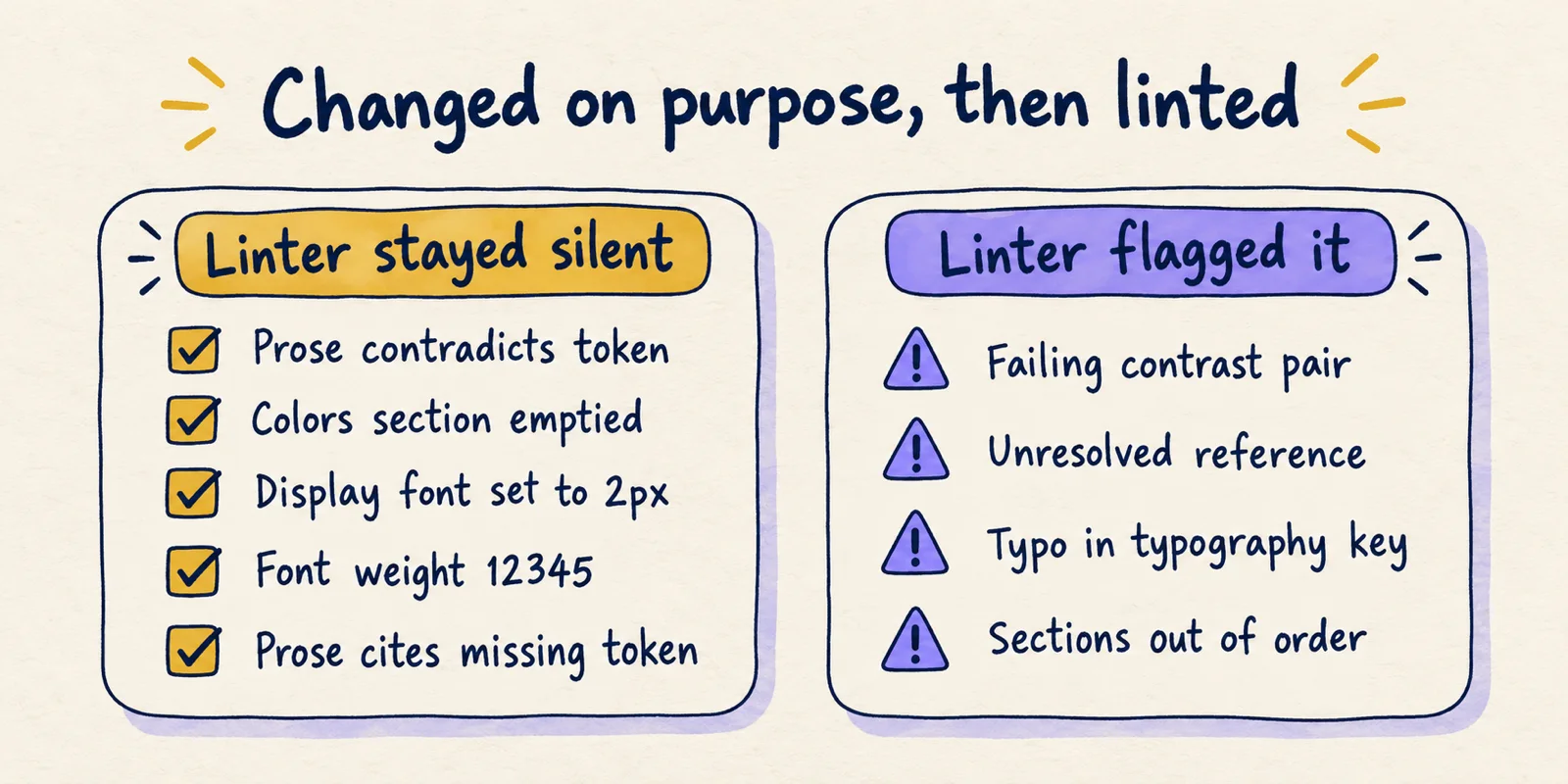
| Change | Linter result |
|---|---|
Prose says primary is bright red #FF0000; token unchanged | No finding |
| All prose after the front matter deleted | No finding |
| Colors section emptied | No finding |
Display font size set to 2px | No finding |
fontWeight: 12345 | No finding |
Prose tells readers to use {colors.brand-magenta}, which does not exist | No finding |
Second ## Colors section appended | One section-order warning, exit 0; the spec says duplicates are an error |
| Shapes section moved before Colors | section-order warning |
| Failing component color pair added | contrast-ratio warning |
full: 50% for a rounded value | Error with no rule ID (invalid unit) |
typography: misspelled as typograhpy: | 4 errors, 3 warnings: unresolved references, missing-typography, unknown-key and token-like-ignored |
Reference to {colors.nonexistent} | broken-ref error |
The pattern is consistent. The linter checks that tokens parse, resolve and meet one accessibility threshold. It does not compare prose with tokens, judge whether a value is sensible, or enforce every rule the spec states. A team that assumes the linter implements the spec in full will be wrong in at least the duplicate-heading case.
The misspelled key shows the opposite effect. One typo produced seven findings, because every component reference to a typography token then failed. When a run is noisy, look for a single upstream cause first.
Silent passes were the sharpest case. The TrekSphere file begins with a different front-matter block (trigger: always_on) followed by a second block with flattened indentation. The linter returned an empty findings list: no errors, no warnings and no token summary. A second file, the compression-library design.md, returned only a "No YAML content found" warning. A third had a YAML syntax error and also returned no summary.
In all three the linter read no tokens, and all three exited 0. A September 2026 write-up from AI-Driven Lab reported the same "No YAML content found" result on a sample file from a third-party site with the same 0.4.0 release (their report).
Four rules never fired on the real files: section-order, missing-typography, unknown-key and omitted-rules. We cannot say whether that means careful authors, a template-shaped sample, or rules that rarely apply. The probes show at least three of the four work when triggered.
How to read a lint run
The sample suggests a short triage order. It is our inference from these runs, not an official procedure.
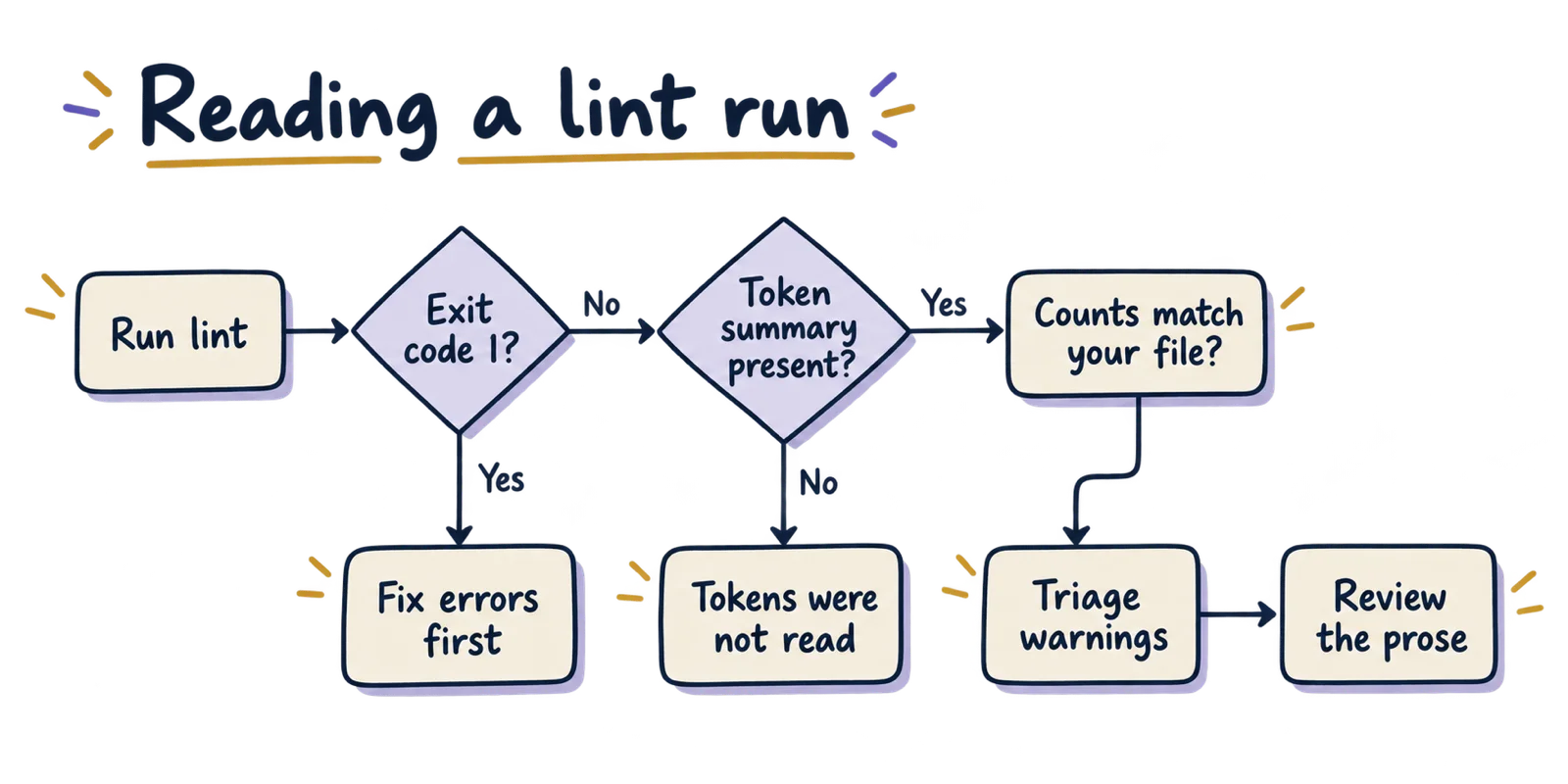
- Pin the version and save the output, for example
npx @google/design.md@0.4.0 lint --format json DESIGN.md. Rules and severities are changing between releases. - Fix errors first. Expect most to be value formats: add units, replace
normalandclamp(), and resolve references. - Confirm a
token-summaryfinding exists and that its counts match what you wrote. Three of our 48 files had none, and in those the linter had read no tokens. - Read warnings by rule. Treat
contrast-ratioon translucent colors with suspicion andorphaned-tokensas information. - Review the prose against the tokens by hand, since no rule compares them.
Worked example: a file defines colors with primary: "#1A1C1E" but the Colors prose says the primary is a warm red. The linter returns the token summary and nothing else, and only step 5 catches it. The spec calls the tokens normative, so the red in the prose is likely to be ignored or to confuse the result. That outcome is our inference; we did not test how any agent reacts.
Better still, settle the structure before writing the file. Drawing the token flow first, as described in the design system diagram guide, makes it easier to spot tokens no component uses.
What this sample cannot tell you
It cannot tell you how common these problems are across all DESIGN.md files. The selection came from one search, one ranking and one date, and newer files, differently named files and private repositories sit outside it.
It cannot tell you whether an agent builds better interfaces from a file that lints clean. We did not test agent output, and the sources we found did not measure it either, so claims that DESIGN.md improves generated UI are unverified here. The markdown-versus-JSON token comparison looks at what evidence exists on that question.
It cannot tell you who wrote the files. Many share generic names and structures, but similar structure is not evidence of origin.
It cannot predict future versions. Five versions (0.1.0 to 0.4.0) were published between April and July 2026. For a view of how token files look in mature systems rather than in this sample, see token formats across ten public design-system repositories. Re-run the commands in the evidence folder against the current release before relying on any count here.
Is the DESIGN.md linter worth running?
Yes, for what it does. It catches unresolved references, malformed values and unreadable front matter before an agent or exporter trips over them, and 21 of our 48 files had at least one such error. That is a useful gate on the machine-readable half of the file.
It is not a review of the design system. Prose that contradicts tokens, implausible values and duplicate headings can all pass, and an unreadable file can pass with no findings. Run it in CI with a pinned version, require a token summary, and keep a human check on the prose.
The same logic applies to design systems that agents write to, such as the setups covered in the Figma agents and canvas write-up: the machine-checkable part is only half the job. Adopting DESIGN.md is cheap to try. Trusting a clean lint result as proof of coherence is the mistake this sample warns against.