AI design tools
Getting Work Out of Claude Design: Every Export and What It Loses
Every documented way to get a Claude Design project out, what each route keeps or loses, and whether a direct Figma export exists yet.
· · Diagram Studio Editorial
You finish a pitch deck in Claude Design on a Tuesday night, click Export, and pick PPTX. On Wednesday morning the title font has shifted and a card has wrapped onto a second line. Nothing is broken, exactly. It is just not the file you designed.
That gap is the real subject of this piece. A Claude Design project is generated HTML, so every export is a translation into some other kind of file, and each translation drops something different. Teams that live in Figma also ask the sharper question: can you send the work there directly?
Read on if you need to decide where a Claude Design project should go next. It draws on Anthropic's documentation and named third-party reviews, not on exports we ran ourselves, so fidelity claims below are attributed to their authors. By the end you can pick a route, know what to check afterwards, and know where the Figma answer stands.
Direct answer
As of October 1, 2026, Claude Design exports to ZIP, PDF, PPTX, standalone HTML, Google Slides, partner tools such as Canva, or a Claude Code hand-off. Anthropic's documentation lists no direct Figma export; people convert standalone HTML with third-party tools. Every route converts the design, so check fonts, layout and editability after exporting.
Pick the export by what happens next
Claude Design can send a project to ZIP, PDF, PPTX, standalone HTML, Google Slides, a list of partner tools including Canva, or Claude Code. It has no direct Figma export in Anthropic's documentation. Nothing is lossless, because each route turns something designed in a browser into a different kind of file.
So the useful question is what the file has to do next. If someone keeps editing the visuals, choose Canva or PPTX. If it must be read exactly as drawn, choose PDF. If it becomes a product, use the Claude Code hand-off. If your source of truth is Figma, you convert standalone HTML with a third-party tool.
it does not (yet) export to Figma. For any team that runs its design workflow in Figma, which at this point is most of them, that is a dealbreaker.
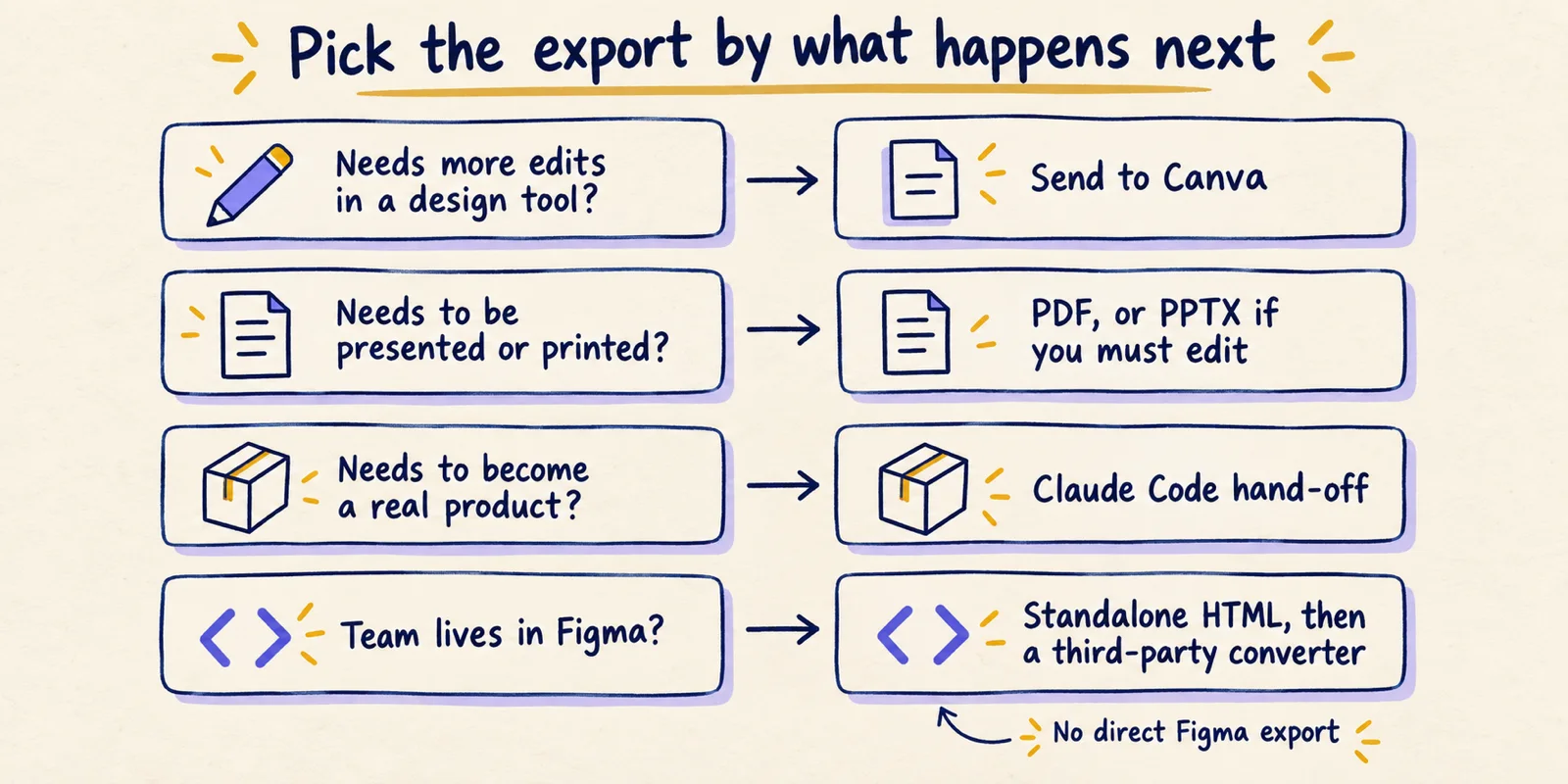
Every documented way out, in one table
Anthropic's Get started with Claude Design help page lists the options below. Claude Design launched on April 17, 2026, and on September 16, 2026 its capabilities moved into ordinary Claude conversations (release notes). The export list matches the launch post and the artifacts help page.
| Route | What you get | What survives | Known losses or unknowns | Evidence |
|---|---|---|---|---|
| Share link (in Claude) | A link to the live project | Everything, because it is the project itself | Viewers need access; permissions are view, comment or edit. No version history yet | Documented |
| Download as .zip | A local package of the project | Source files; contents not itemised by Anthropic | Anthropic does not list the files inside | Documented (contents unknown) |
| Fixed pages | Layout as rendered | Reported: images or card styling sometimes come out wrong | Reported | |
| PPTX | PowerPoint file | Editable text boxes and shapes | Reported: fonts shift, wraps change, complex layouts drift | Reported |
| Standalone HTML | A single web page | Whatever a browser can run | Not editable in a design tool without conversion | Documented format, inference on fidelity |
| Google Slides | Slides deck | Not detailed | Only available at claude.ai/design | Documented |
| Partner tools (Canva and others) | A project opened in that tool | Canva reports editable files | Anthropic does not detail what each partner keeps | Documented list, reported fidelity |
| Claude Code hand-off | A bundle for a coding agent | Structure, tokens, assets | Anthropic does not detail the bundle | Documented route, reported contents |
| Figma | Not offered | Not applicable | Third-party converters only | Documented absence in Anthropic's lists; reported by reviewers |
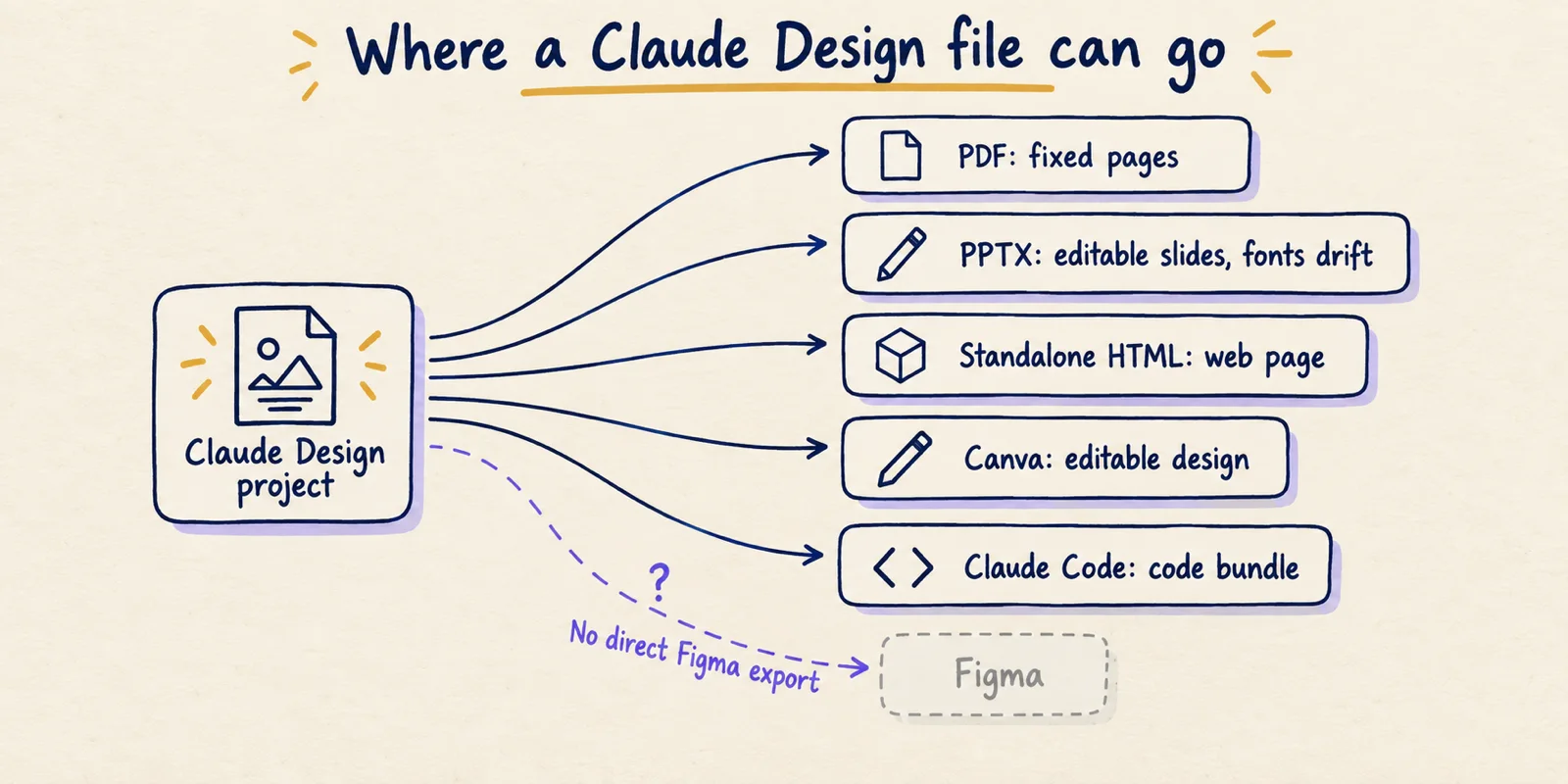
The launch post also mentions saving designs as a folder and sharing an internal URL. The current help page says .zip instead, so the folder wording reads as the older description of the same idea.
PDF, PPTX and HTML: what each format keeps
Anthropic describes these options but not their fidelity, so the evidence is mostly reviewers. All of it dates from April to June 2026, and the product has changed since.
PDF fixes the layout, which suits a reader who should see exactly one thing. Óscar Martín, Director of Platform at Very Good Ventures, wrote in June 2026 that PDF export has problems he advises checking for:
Exporting to PDF, for example, sometimes messes up images or elements like cards, with the styling coming out wrong.
PPTX stays editable but drifts. The same author says it "usually opens fine in PowerPoint and Keynote, but complex layouts can drift on the way out." A June 20, 2026 write-up by Yuto Noguchi reports slightly shifted fonts and one or two formatting discrepancies per slide, since HTML text is measured differently from slide text. Everything stayed editable and fixes took a minute or two per deck. One reviewer's experience is not a failure rate.
Standalone HTML is the format closest to how Claude Design builds things, so for anything that must still behave like a web page it should lose least. Its limit is that a designer cannot open it in a design tool and drag a layer. It is also the input every Figma conversion starts from.
The practical rule: if the layout matters to the pixel, export something you can inspect fast, PDF or HTML, and look before sending. If editing matters, accept drift and budget a short clean-up pass.
Sharing, Canva and the other partner tools
Sharing is the one route that loses nothing, because the recipient sees the project itself. Anthropic's help page says designs start private and you choose who can open them and what they can do. Anthropic's launch post describes sharing scoped to your organisation, so someone outside it realistically needs a file export. Check your own account for external links.
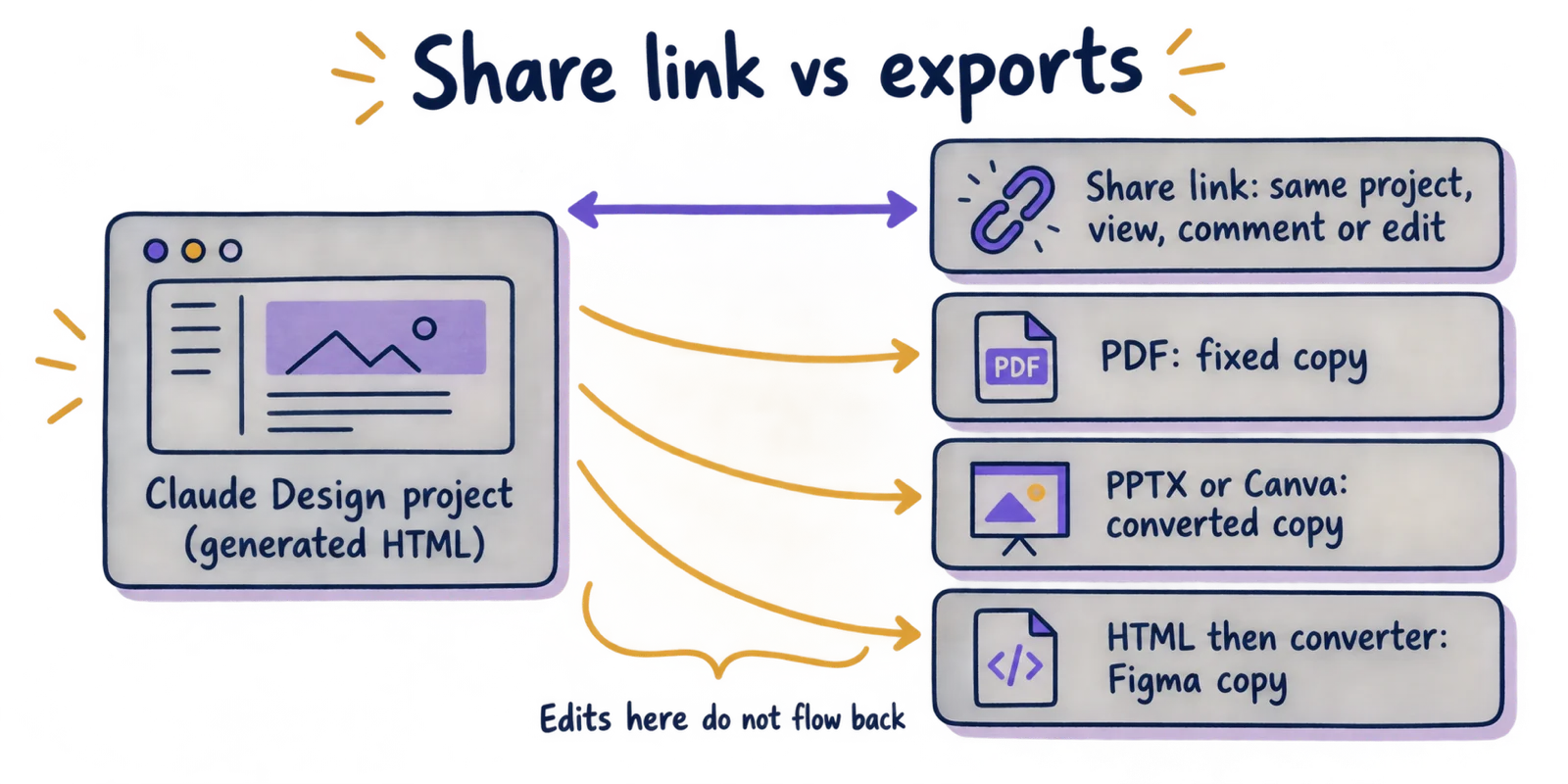
Anthropic also states that Claude Design "doesn't have version history yet." An export is a snapshot, so ask Claude to save the current version before trying a new direction. Regenerating and re-exporting also draws on your plan, which the usage limits article covers.
Canva. At launch Anthropic quoted Canva's CEO saying designs "instantly become fully editable" there. Anthropic publishes no list of what Canva keeps, so confirm fonts and spacing on a first export.
Other partners. The help page lists Adobe Experience Manager, Adobe for Creativity, Adobe Journey Optimizer, Base44, Canva, Gamma, HubSpot, Hyperframes, Lovable, Miro, Netlify, Replit, v0, Vercel and Wix. These are destinations, not guarantees about what arrives, so treat each as a first-use experiment.
The Claude Code hand-off, briefly
The hand-off turns a design into working software. Anthropic's launch post says Claude "packages everything into a handoff bundle that you can pass to Claude Code with a single instruction." The help page names two options: "Send to local coding agent" and "Send to Claude Code Web."
What is in the bundle is not itemised by Anthropic. A third-party guide at claudefa.st reports component structure, design tokens, layout hierarchy and assets rather than a screenshot. That is reported, not documented. If your tokens live in a rules file, Markdown versus JSON design tokens explains what agents actually read.
Mechanics, prompts and failure modes are in the Claude Design to Claude Code hand-off guide. The point to keep from here: this route is one way, to code, and not back to an editable design file.
Is there a direct Figma export? Not yet
The documentation was rechecked on October 1, 2026, and the search repeated on October 2: Anthropic's help page, launch post and release notes do not mention Figma, and a search for a newer announcement found none. Absence of an announcement is not proof, so look at the Export menu in your own account.
Reviewers agree. Antoniou, quoted above, calls the gap a dealbreaker and says the export is a one-off that must be regenerated if the design changes. Anima's April 18, 2026 guide states there is no native Figma export.
Two things are easy to confuse with it. Figma and Anthropic announced on February 17, 2026 a way to capture a running UI built in Claude Code and paste it into Figma as editable frames (Figma's post). That runs from Claude Code to Figma, not from Claude Design; agents writing to the Figma canvas covers that direction.
The second is third-party conversion. The html.to.design docs list a browser extension, a plugin and a URL import, and say they keep layer hierarchy, editable text, colours as local styles, images and auto-layout, while CSS animations do not transfer and custom fonts may need installing. Anima describes a similar route that loses interactivity by its own account. Both vendors are describing their own products.
How Figma and Google Stitch export, for comparison
Figma is a hand-edited design file; Claude Design and Stitch generate designs from prompts. The table shows where each tool's work can go. For how each sits among code-generation approaches, see the four design-to-code mechanisms.
| Tool | Editable design file | Static output | Code or agent route | Notes |
|---|---|---|---|---|
| Claude Design | Canva; Figma only via third-party conversion | PDF, PPTX, ZIP | Claude Code hand-off; standalone HTML | No version history yet |
| Figma | The Figma file is the source | PNG, JPG, SVG, PDF | Dev Mode code snippets in CSS, iOS and Android; variables; paid plans with a Full or Dev seat | SVG text becomes outlines by default, so it is no longer editable text |
| Google Stitch | Copy to Figma, which Google staff on its developer forum acknowledged appears intermittently | Not covered by sources read | MCP server, SDK and skills; exports to AI Studio and Antigravity; DESIGN.md design-rules format | HTML and CSS code export is reported by third-party reviews |
The structural difference matters more than the format lists. Figma and Stitch hold the design in a form a designer can edit, so exports are views of it. Claude Design's project is generated HTML, so a PPTX or Canva file is a translation that goes one way. Google open-sourced the DESIGN.md format on April 21, 2026 so design rules can move between tools as plain text, which helps carry tokens but not layouts.
Claude reads your codebase and design files to build your team's design system, then applies it automatically, keeping every project on-brand.
— Claude (@claudeai) View on X
A five-minute check before you export
Fidelity depends on the file and the destination, so a short routine beats picking a format by reputation.
- Name the next step. Write one line: who opens this file, in which program, and what they will change.
- Choose the route from the table: Canva or PPTX for further editing, PDF for reading, HTML for the web, Claude Code for building, converter plus Figma for a Figma team.
- Ask Claude to save the current version, because the project has no version history.
- Export once, then open the file in the destination program, not a preview.
- Check three things: fonts (substitutions show up first in titles), text wrapping and image crops.
- Keep the share link or ZIP as the source, and treat the converted file as a copy.
- If the destination is Figma, re-check colours, auto-layout and fonts after conversion, and expect animations and interactivity not to carry over.
Take a founder with a ten-slide pitch deck due tomorrow. The next step is presenting, so PDF is the safe file and PPTX the editable one. Export both, open the PPTX in the presenting machine's PowerPoint, and compare titles against the PDF. If fonts drifted, fix them by hand or present from the PDF.
What this means for your Figma-or-not decision
Claude Design gives you several exits and each trades something: sharing keeps everything but needs the recipient inside Claude, PDF fixes the layout, PPTX and Canva stay editable at the cost of drift, HTML stays a web page, and the hand-off leads to code.
If a team lives in Figma, the honest answer on October 1, 2026 is that getting work out of Claude Design and into Figma means a converter, and a converter means a check. Decide the destination before you design, test one export on a real file, and keep the project link as the source of truth.